
Sub-Account Dashboard: Pipeline-Specific Insights for General Opportunity Widgets
You can now drill down into individual pipeline performance directly from the general widgets you already use.
👀 What’s New?
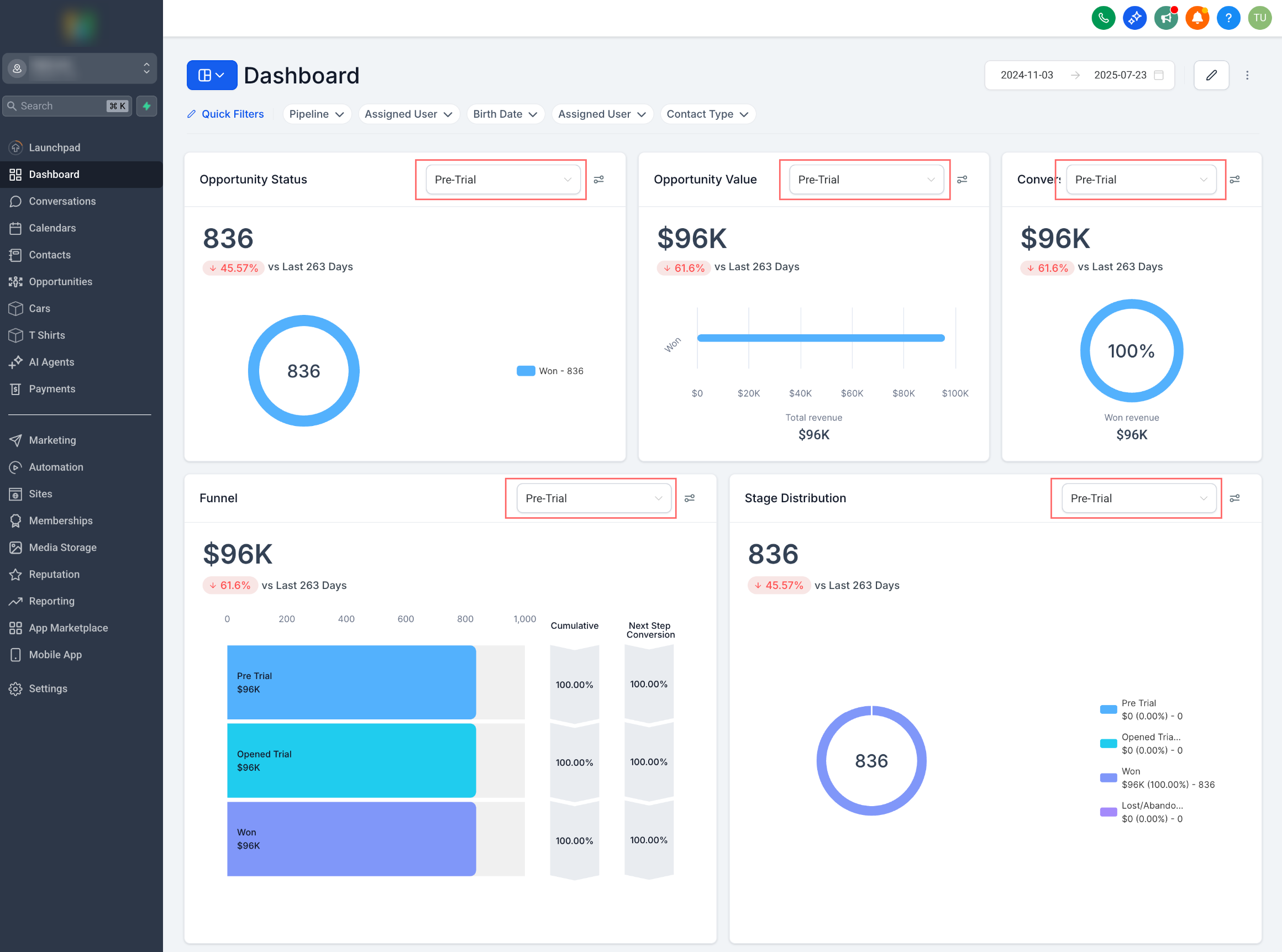
Previously, the Opportunity Status, Opportunity Value, and Conversion Rate widgets displayed aggregated values across all pipelines. This made it difficult to isolate performance metrics for specific workflows or sales processes.
With this release, users can now filter each of these widgets by a specific pipeline using a new dropdown selector.
👷 How It Works:
1. Navigate to any of the following widgets on your sub-account dashboard: Opportunity Status, Opportunity Value and Conversion Rate
2. Click the pipeline dropdown located on the widget.
3. Select the desired pipeline to view metrics specific to that pipeline only.
⭐ Why it Matters:
This improvement gives you granular visibility into how each pipeline is performing—making it easier to identify bottlenecks, track progress, and optimize your sales process. Whether you’re managing multiple service offerings or sales teams, you now have more control and precision over your dashboard insights.
📞 Make Calls On-the-Go — Without Buying a Number!
Stay in the zone and connect with leads directly from the mobile app using your own SIM number.
🧩 The Problem
You’re reviewing contacts, opportunities, or conversations in the app and want to call a lead – only to realize you haven’t set up a bought a business number or it is not supported. The old way? Copy the number, switch apps, and manually dial. It’s clunky, slow, and breaks your flow.
✅ The Solution
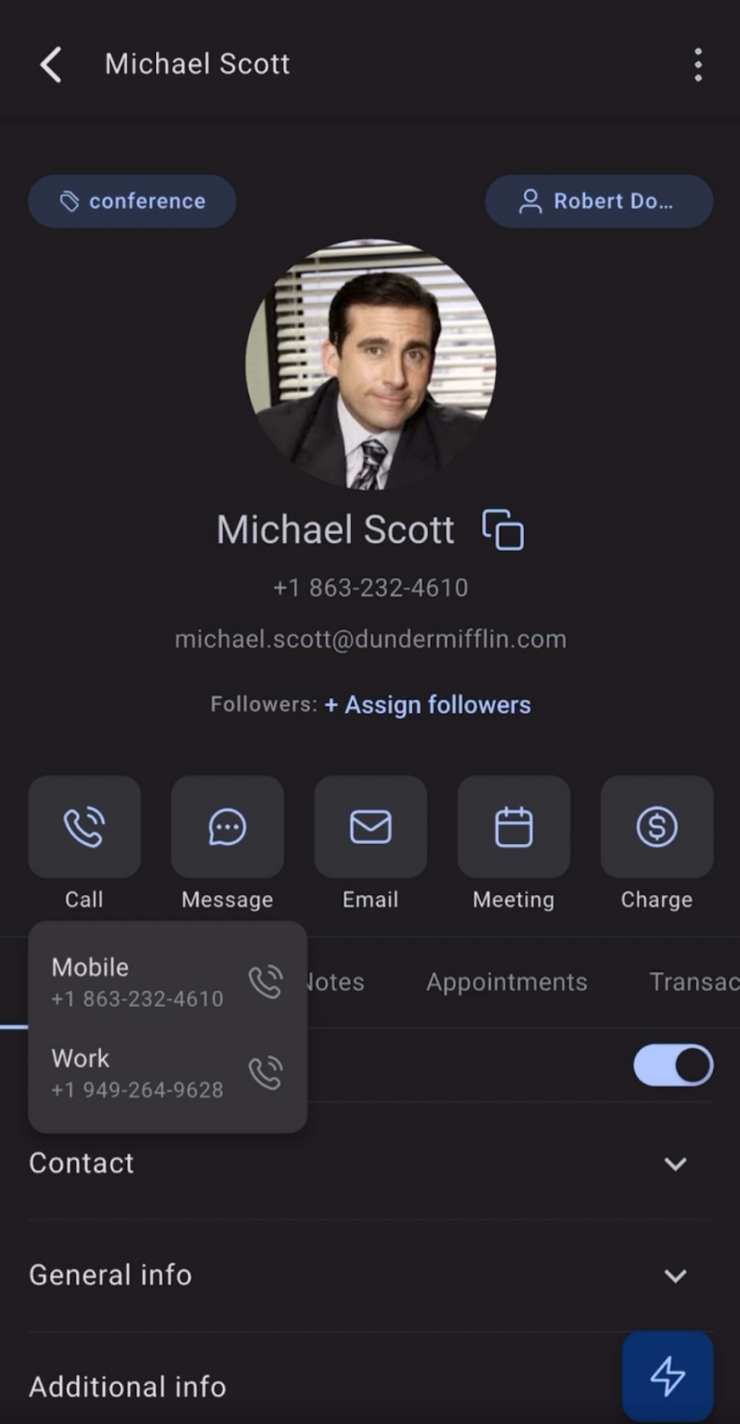
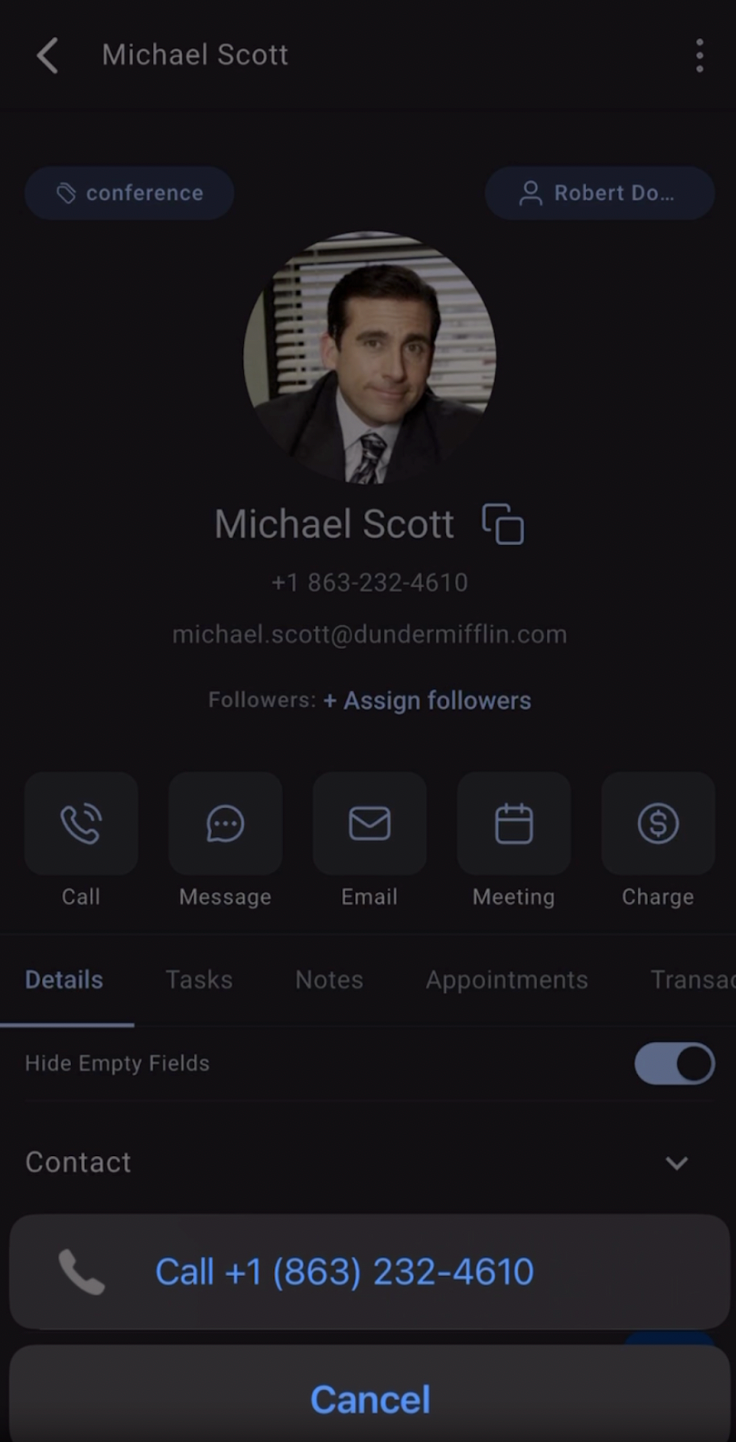
With SIM-based calling, you can now tap the call icon anywhere in the app – Contacts, Opportunities, or Conversations and instantly launch your phone’s native dialer with the number prefilled. No copy-paste. No setup. Just tap and talk.
🚀 What’s New?
• Call leads from the app even if you haven’t purchased a business phone number
• Automatically opens your phone’s dialer with the contact’s number filled in
• Works seamlessly across Contacts, Opportunities & Conversations
• No configuration needed, uses your mobile SIM plan
✨ Why This Matters
• Cut friction and save time on outreach
• Enable calling for teams without business phone setup
• Give your team a smooth, mobile-first calling experience
🔧 What’s Coming Next
• 📝 Manual call logging for SIM-based calls – to trigger workflows and save notes
• 🤖 Android-only: Automatic logging of SIM calls to leads – so every call is tracked effortlessly
📲 How does it look
Availability:
HighLevel v3.103.4 and above
LeadConnector v3.103.4 and above
White Labelled apps – Update to be requested
Prepped for Every Call: Scripts at Your Fingertips 📜
Streamline Calls with In-App Call Scripts
Give your team real-time guidance to close more deals, stay consistent, and build better conversations.
🧩 The Problem
Agents often face uncertainty during calls, missing key qualifiers, forgetting talk tracks, or handling objections inconsistently. This leads to unpredictable outcomes, lost opportunities, and inconsistent customer experience.
✅ The Solution
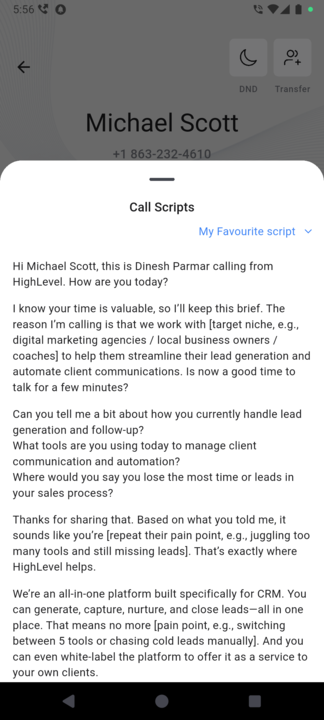
Introducing Call Scripts in the mobile app. Admins can now create and assign pre-built scripts that agents can access live during a call. Whether it’s for discovery, objection handling, or compliance, agents now have a structured path in every conversation.
🚀 What’s New?
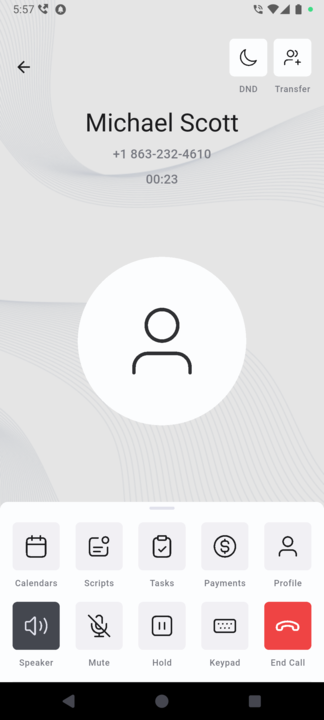
• Access Call Scripts live during any mobile call
• reaCte scripts from Web under Phone Numbers > Advanced Settings > Call Scripts
• Tap the Script icon on-call to instantly pull up the right guidance
✨ Why This Matters
• Train new reps faster with clear, repeatable talk tracks
• Improve consistency and confidence in every conversation
• Boost conversions with better qualification and objection handling
• Deliver smoother, more trusted customer interactions
How does it look
Availability:
HighLevel v3.103.4 and above
LeadConnector v3.103.4 and above
White Labelled apps – Update to be requested
Voice Call Pricing Changes – Effective August 11, 2025
📥 Overview
Our downstream carrier has announced pricing updates for Programmable Voice outbound minutes and toll-free local incoming minutes across select countries. These changes will take effect starting Aug 11, 2025, and will impact the cost of outbound voice calls and toll-free inbound minutes.
📊 What’s Changing?
Outbound Voice (Programmable Outbound Minutes)
• St. Lucia – Mobile: $0.4800 → $0.5040
• Kazakhstan – Mobile: $0.3350 → $0.3518
• Togo: $0.5400 → $0.6210
• Colombia – Mobile – Movistar: $0.0287 → $0.0312
• Taiwan – Mobile: $0.1890 → $0.1985
• Colombia – Mobile: $0.0287 → $0.0312
• Lebanon – Mobile: $0.2800 → $0.3080
• Afghanistan: $0.3200 → $0.3680
• Australian External Territories: $3.3000 → $3.6300
• Kuwait: $0.0800 → $0.0920
• British Virgin Islands – Mobile: $0.4490 → $0.4715
• Saudi Arabia – Mobile: $0.2250 → $0.2588
• Ecuador – Mobile: $0.3300 → $0.3795
• Monaco – Mobile: $0.5500 → $0.6325
• Djibouti: $0.5550 → $0.6105
• US Virgin Islands: $0.0360 → $0.0414
• Singapore: $0.0368 → $0.0423
• Palestinian Territory – Mobile: $0.3026 → $0.3189
• Dominican Republic: $0.1100 → $0.1155
• Denmark: $0.0190 → $0.0219
• United Kingdom – Special Services: $0.2500 → $0.2625
• Guatemala: $0.2250 → $0.2475
• Latvia – Mobile: $0.3818 → $0.4229
• Egypt – Mobile: $0.1700 → $0.1870
• Spain – Special Services: $0.6867 → $0.7210
• Ghana – Mobile: $0.3700 → $0.4070
• Colombia – Mobile – Comcel: $0.0287 → $0.0312
• Uruguay – Montevideo: $0.0700 → $0.0805
• Qatar – Mobile: $0.3000 → $0.3150
• Jamaica: $0.4100 → $0.4305
• Tonga: $1.8030 → $2.0735
• French Guiana – Mobile: $0.1660 → $0.1909
• Vietnam – Mobile: $0.1200 → $0.1260
• New Zealand: $0.0265 → $0.0305
• Austria – Other: $0.1500 → $0.1650
• Colombia – Mobile – Tigo: $0.0287 → $0.0312
⚡ What You Need to Do
No action needed! These rate changes will automatically apply to your account from Aug 11.
🔍 Why It Matters
We know how important it is to manage voice call costs, especially if you’re running high-volume call campaigns. By keeping you informed about carrier pricing changes in advance, we help you plan proactively and avoid surprises in your billing.
WhatsApp Workflow Trigger: Click-to-WhatsApp Ads & Facebook Page CTA
Turn ad clicks into instant conversations. A new workflow trigger now fires the moment a prospect messages you through a Click-to-WhatsApp Ad or a Facebook Page Call-to-Action button, letting you automate replies, assign leads, and launch follow-ups the second high-intent users reach out.
What’s New
Click-to-WhatsApp Ads / Page CTA Trigger
Start any workflow the instant a customer taps an ad or Page button and sends a WhatsApp message.
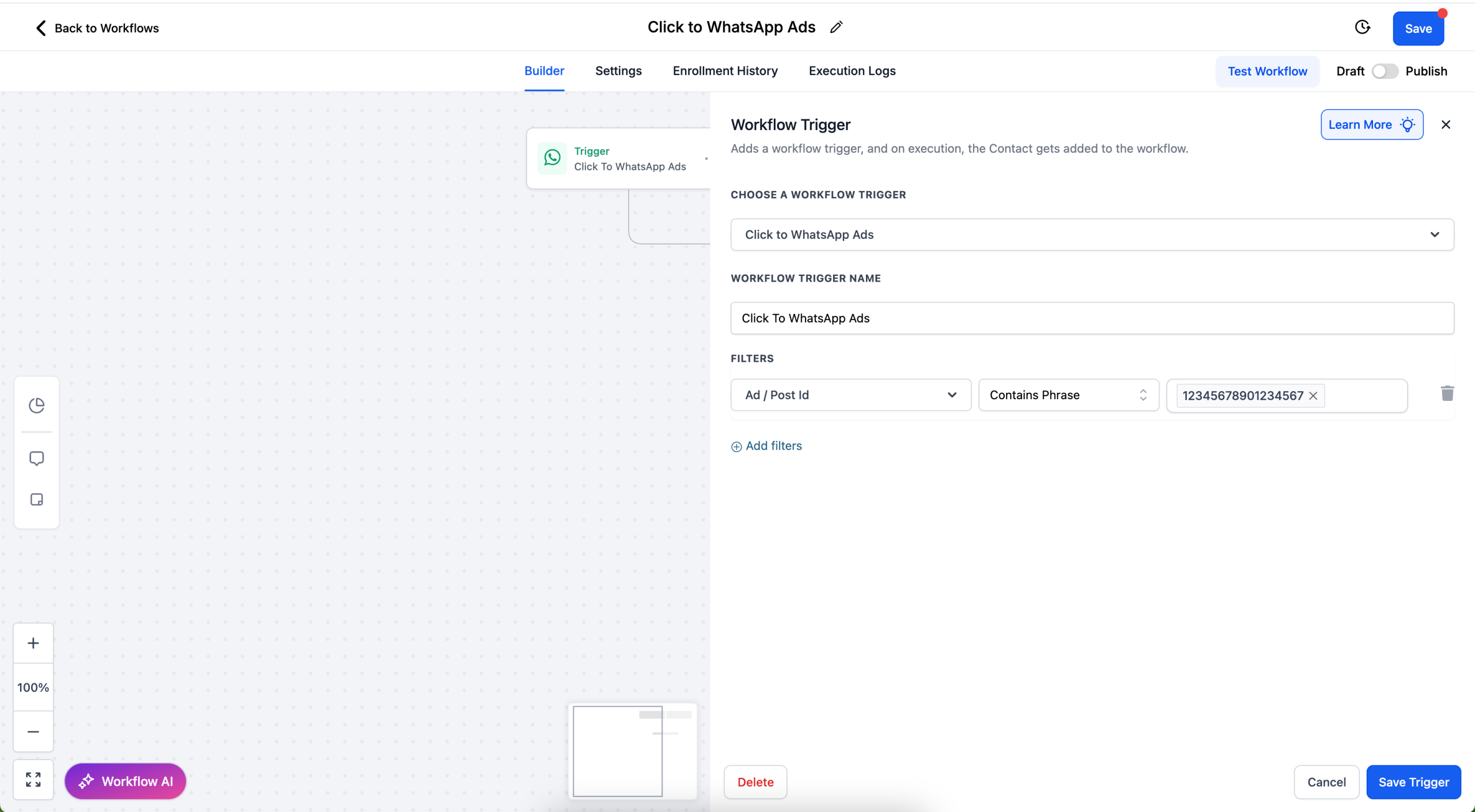
Filter by Ad or Post
Narrow automation to a specific Ad ID, Post ID, or URL for granular control.
Free Entry-Point Conversations
Respond within 24 hours and unlock a free 72-hour messaging window—no template fees, unlimited sends.
Why It Matters
Instant Lead Engagement – Strike while interest is hottest and boost ad ROI.
Cost-Efficient Messaging – Enjoy 72-hour free entry-point sessions when you reply in time.
Seamless Follow-Up – Route, tag, or nurture leads automatically instead of relying on manual outreach.
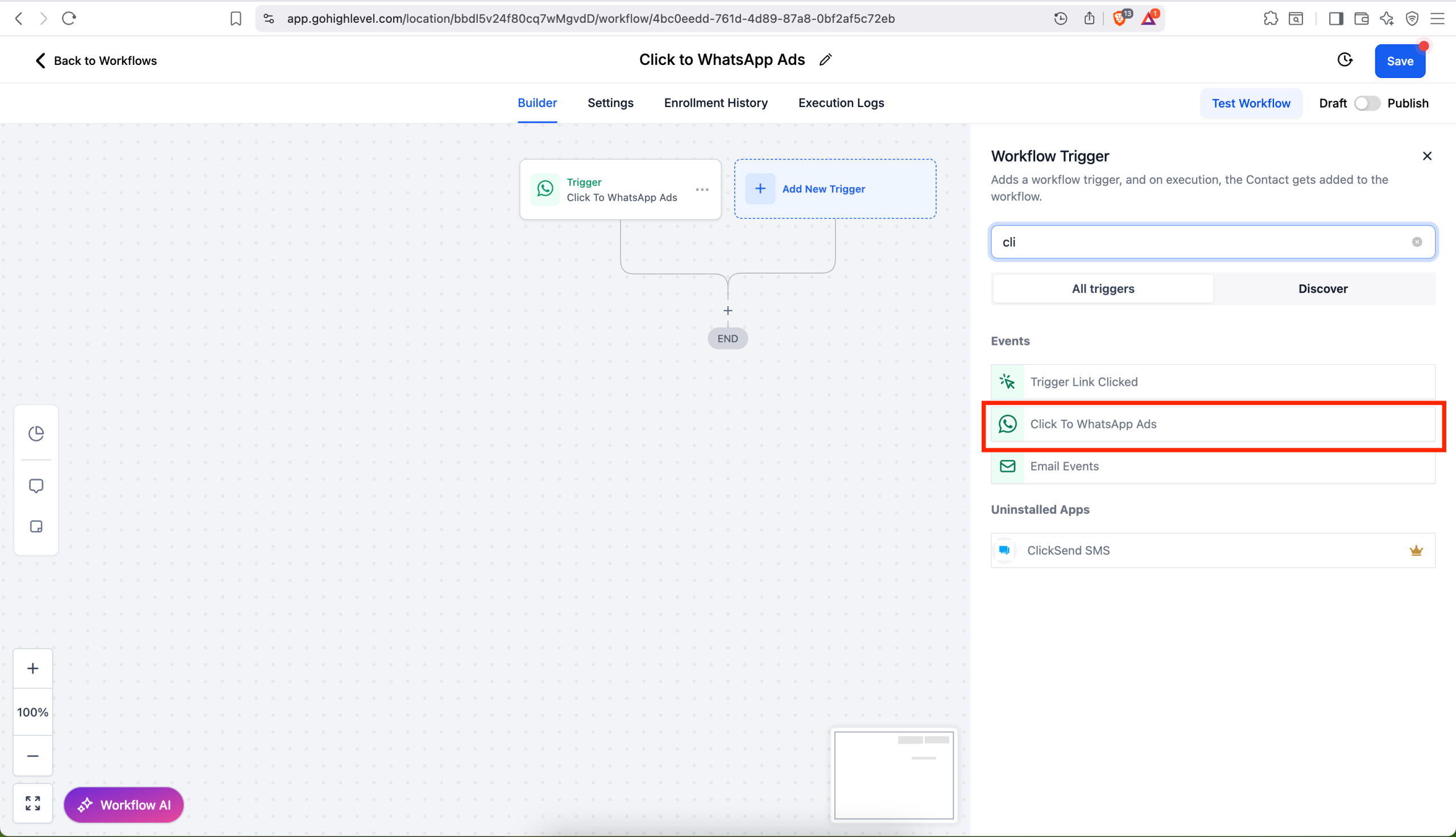
How to Set It Up
Automation → Add New Trigger → Click-to-WhatsApp Ads
(Optional) Add filters: Ad/Post ID or URL.
Save, then add the actions you want—send a message, assign a pipeline stage, fire a webhook, etc.
Support Article: Link
Free Entry-Point Conversation Rules
Opens when:
A user taps your ad or Page CTA on Android/iOS and messages you.
You respond within 24 hours.
Duration: 72 hours from your first delivered reply.
Cost: All messages (templates and free-form) are free inside that window.
Other conversations close automatically until the 72 hours expire.
Quick FAQ
What counts as a trigger event?
Any WhatsApp message initiated from a Click-to-WhatsApp Ad or Facebook Page CTA on mobile.
What if I reply after 24 hours?
No free session opens; you must use a paid template to re-engage.
Can I mix template and non-template messages?
Yes. Free-form is allowed while the 24-hour customer-service window is open; otherwise use templates.
How are charges handled?
Inside the 72-hour free entry-point conversation, no messaging fees apply. Outside that window, normal WhatsApp conversation pricing resumes.
Automate your ad responses today—convert clicks into conversations without delay or extra cost.