
New Workflow Pricing Categories: Premium Features & AI Models
Overview
We’ve restructured our paid actions and triggers into clearer categories to simplify pricing and improve user experience. This update introduces two distinct categories:
– Workflow – Premium Features
– Workflow – External AI Models
What’s New?
We’ve re-organized our chargeable actions and triggers into two categories:
1. Workflow – Premium Features
– Includes all premium actions, triggers and Workflow AI actions are now Premium actions
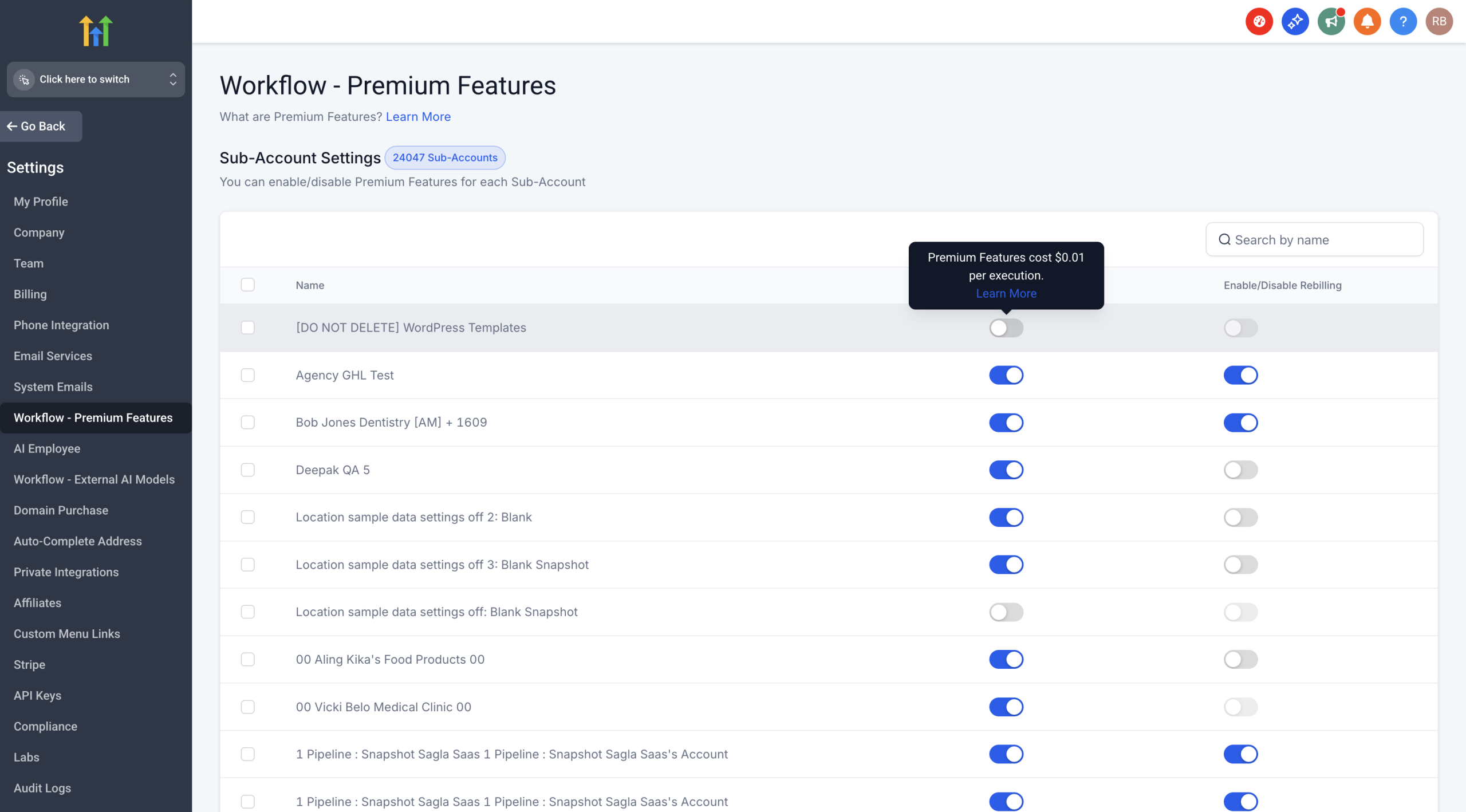
– Fixed pricing at $0.01 per execution
2. Workflow – External AI Models
– GPT Action (at OpenAI rack pricing)
– Future LLM integrations
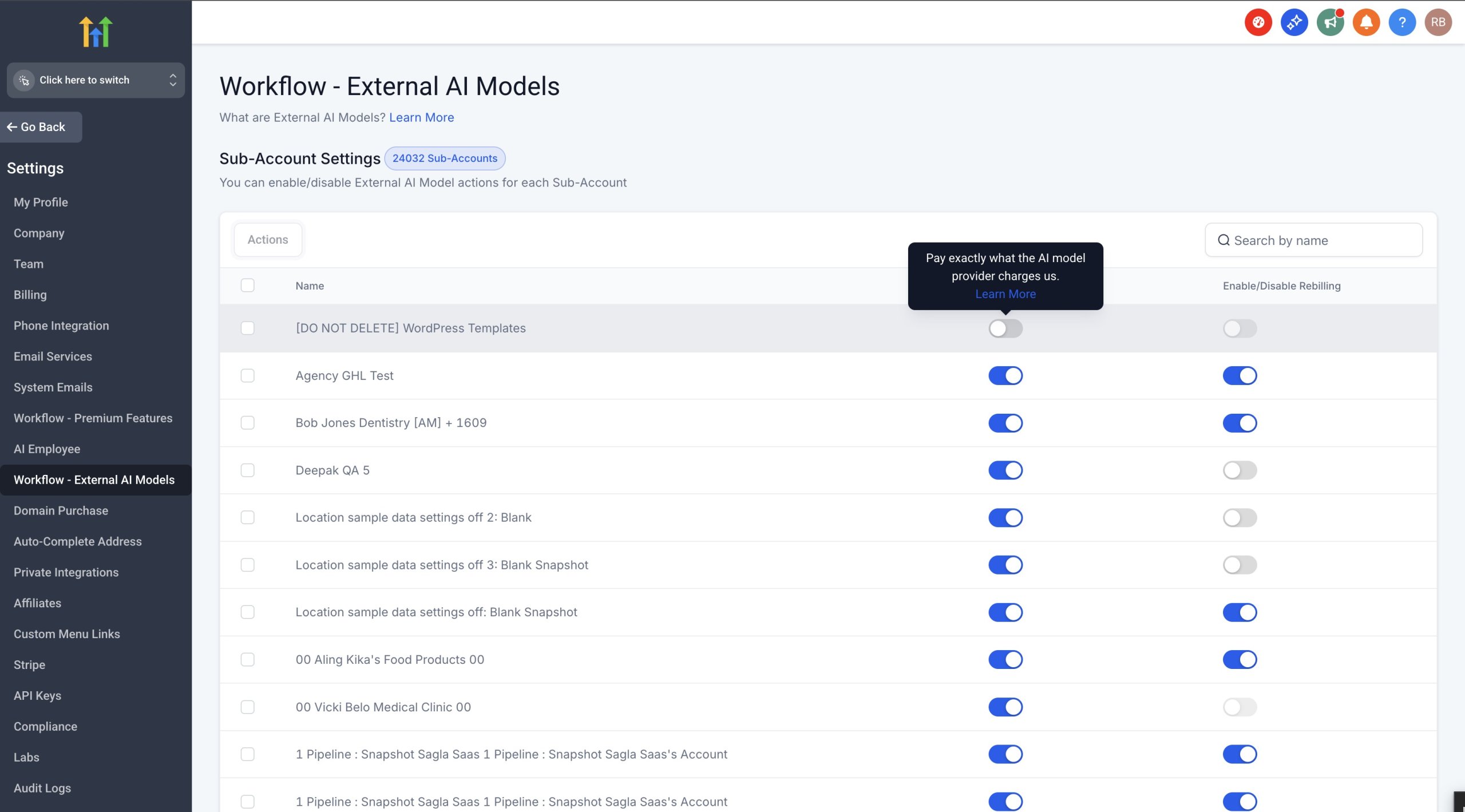
– Pay exactly what the AI provider charges – no markup
Key Changes
Workflow AI Actions Are Now Premium Actions: All Workflow AI actions now fall under Premium Features at $0.01/execution:
– Translate Content
– Summarize Text
– Decision Maker
– Intent Detection
These Workflow AI actions join Copy Contact, Custom Webhook, and many other premium actions and triggers under one unified Premium Features category.
Staying in External AI Models:
– GPT Action – Continues at OpenAI rack pricing
How to Enable
For Both Categories:
1. Navigate to any action that requires enablement
2. Click “Enable Now” when prompted
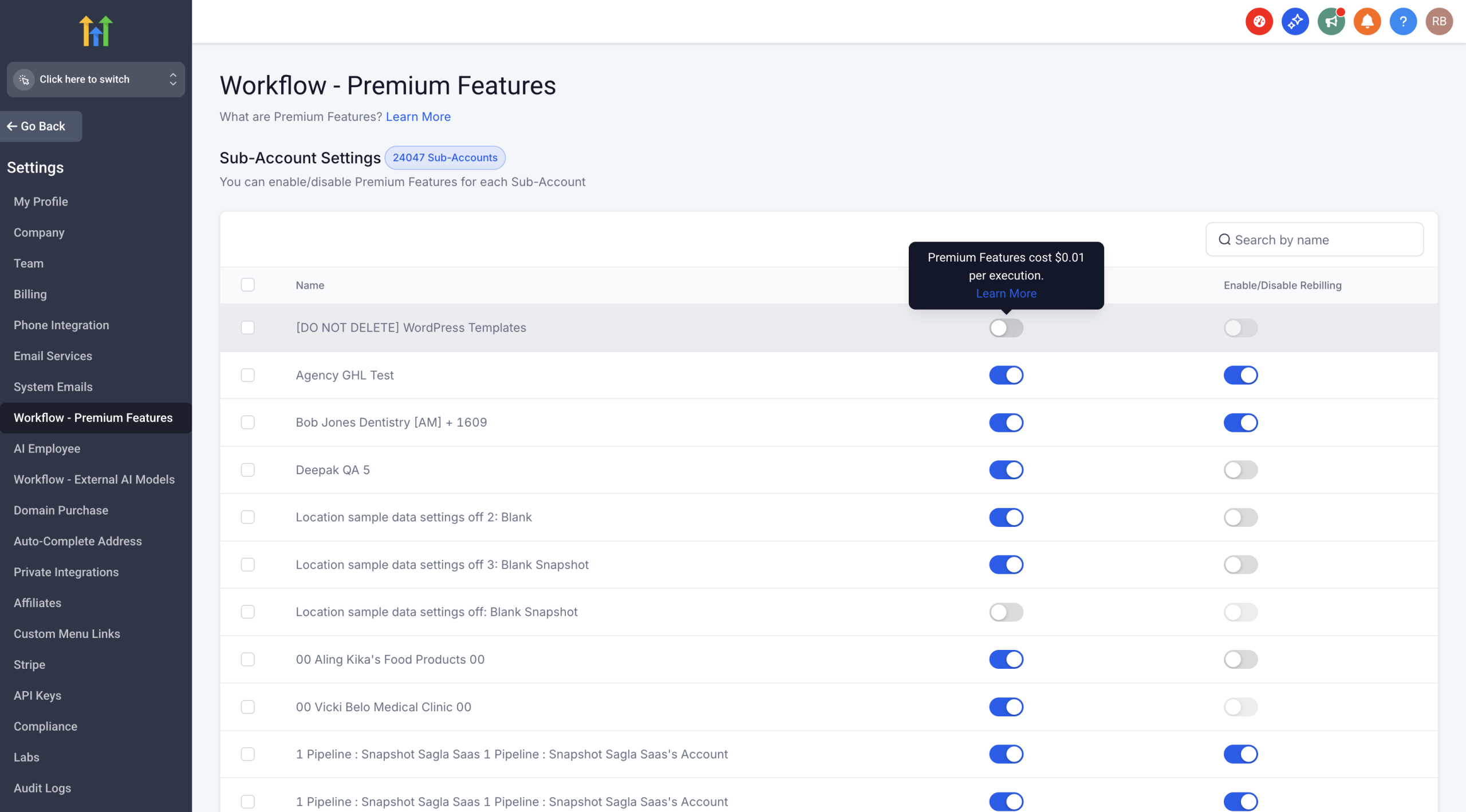
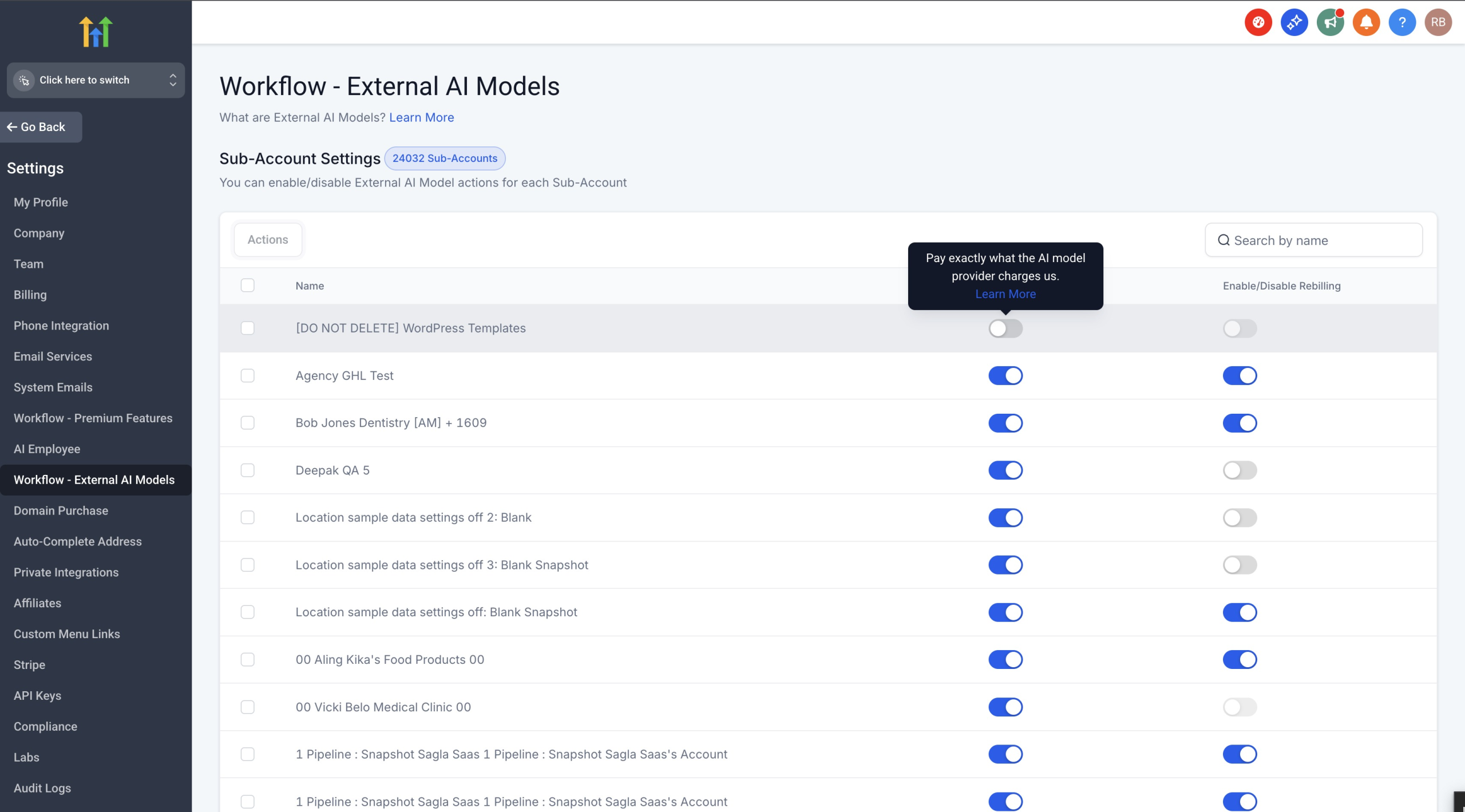
3. You’ll be taken to Sub-Account Settings where you can:
– Toggle specific sub-accounts on/off
– Enable/Disable rebilling for each sub-account
– View which sub-accounts have the feature enabled
Sub-Account Management:
– Access via Settings → Workflow – Premium Features or Workflow – External AI Models
– Enable/disable features for individual sub-accounts
– Configure rebilling settings per sub-account
Re-billing Capabilities
Both categories support re-billing:
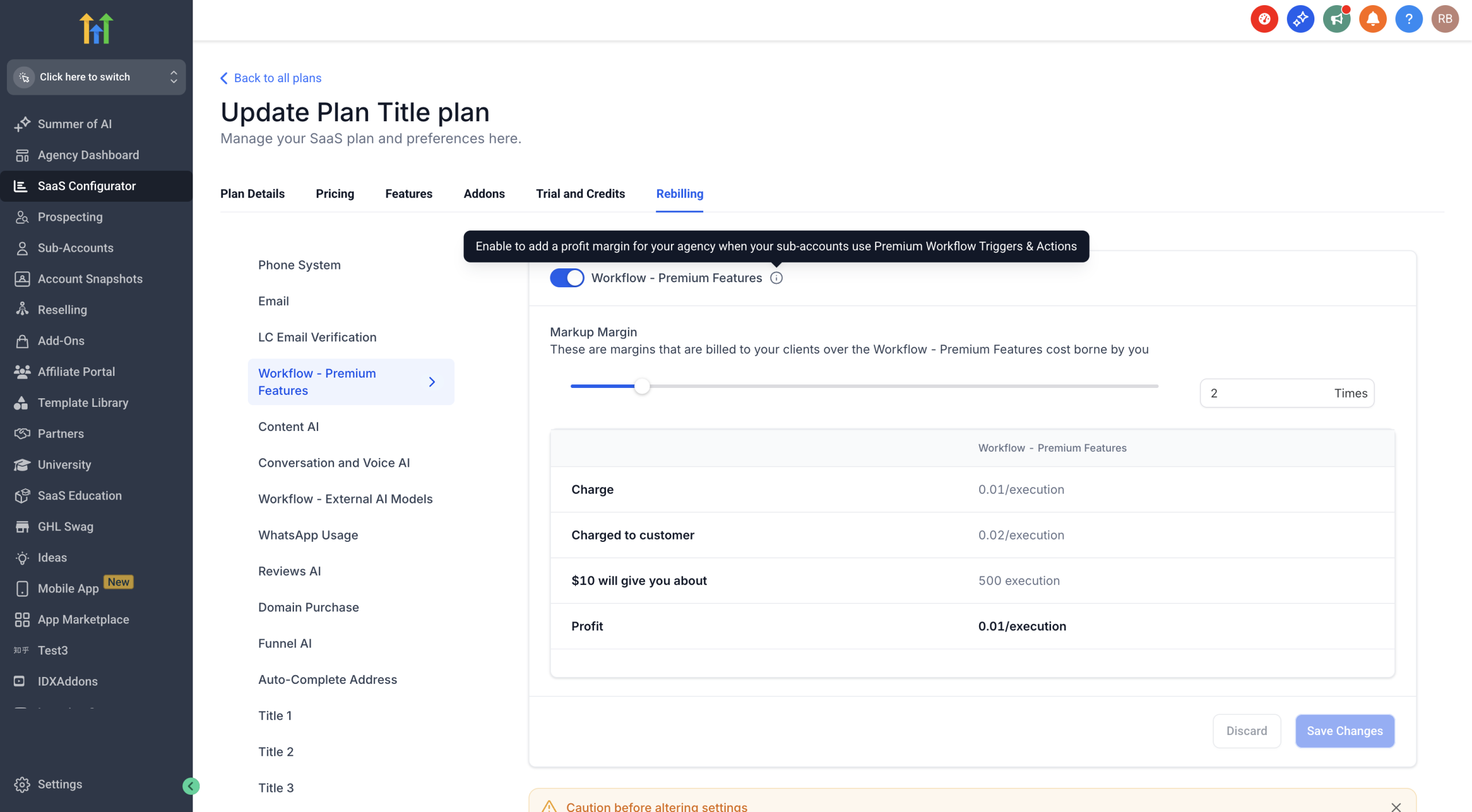
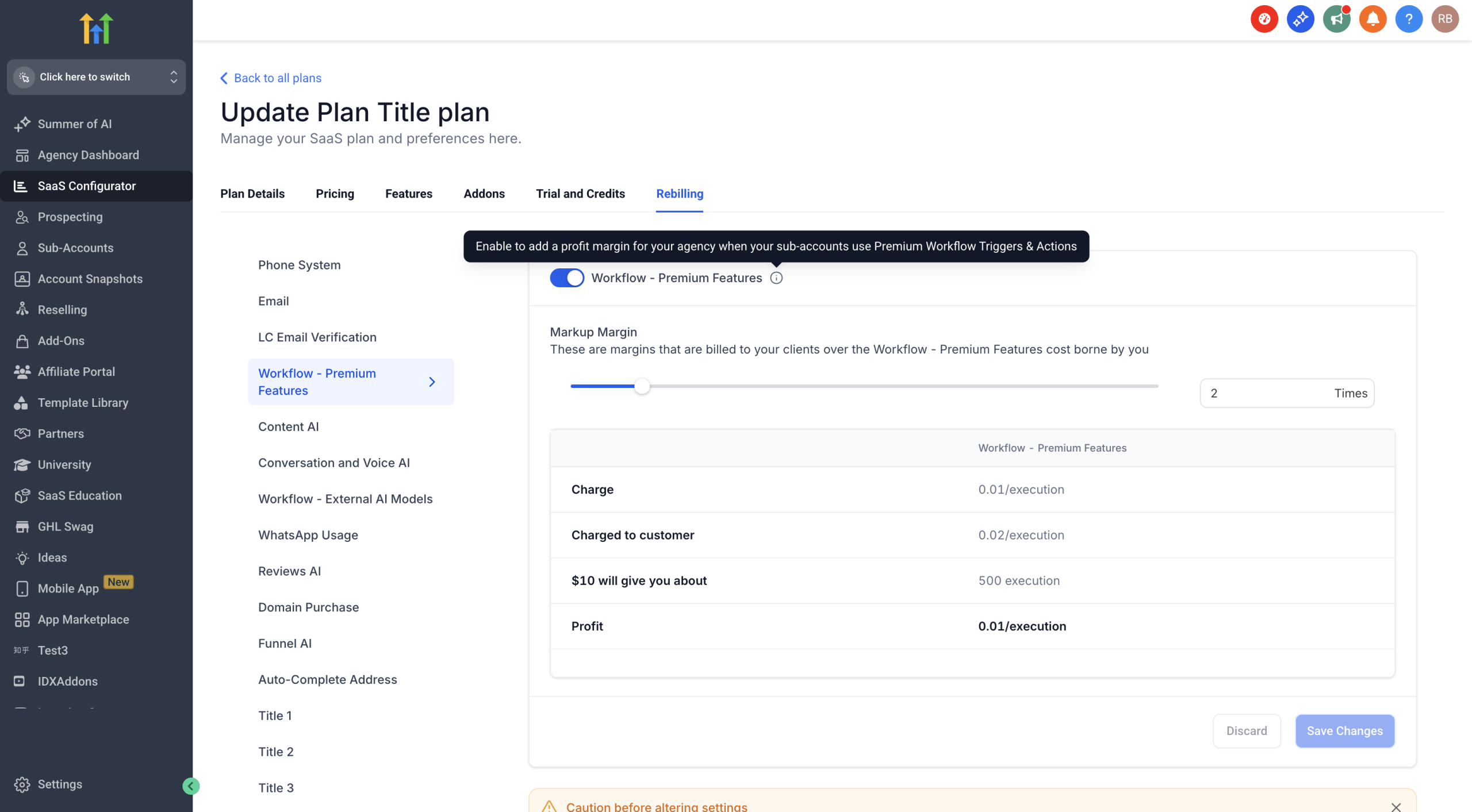
– Workflow – Premium Execution: Set your own markup above the $0.01/execution base cost
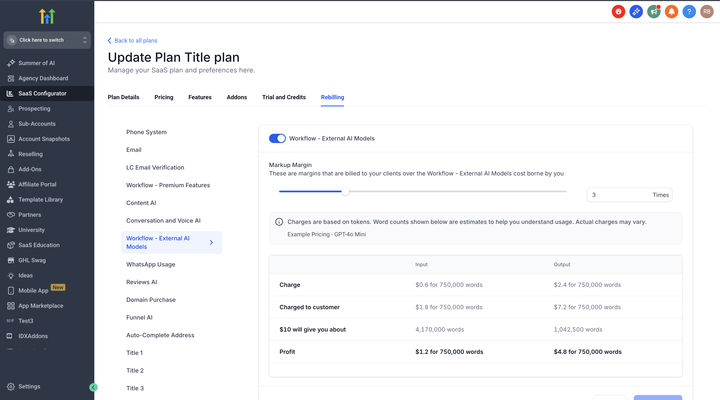
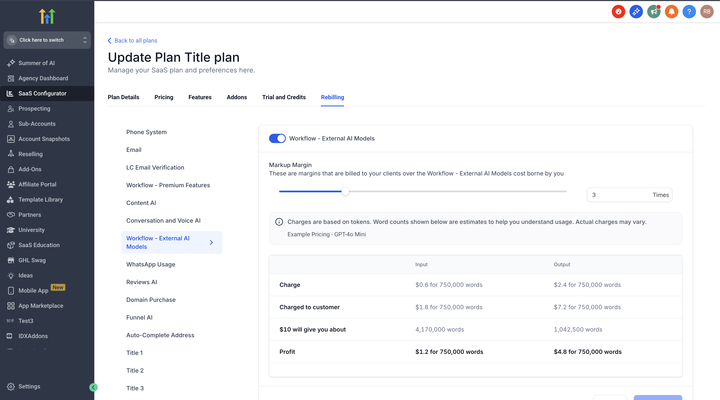
– Workflow – External AI Models: Add your markup on top of the OpenAI rack pricing
– Configure re-billing amounts in SaaS Configurator under the Rebilling tab
Why This Change?
– Clarity: Clear distinction between fixed-price actions and variable-price AI models
– Better organization: Makes it easier to find and use the right actions
– Future-ready: Sets the foundation for adding more AI providers
What This Means for You
– Predictable budgeting with $0.01/execution for Premium Execution actions
– Transparent pricing for External AI Models – pay exactly what providers charge
– Flexible re-billing options for both categories to set your own margins
New Workflow Pricing Categories: Premium Features & AI Models
Overview
We’ve restructured our paid actions and triggers into clearer categories to simplify pricing and improve user experience. This update introduces two distinct categories:
– Workflow – Premium Features
– Workflow – External AI Models
What’s New?
We’ve re-organized our chargeable actions and triggers into two categories:
1. Workflow – Premium Features
– Includes all premium actions, triggers and Workflow AI actions are now Premium actions
– Fixed pricing at $0.01 per execution
2. Workflow – External AI Models
– GPT Action (at OpenAI rack pricing)
– Future LLM integrations
– Pay exactly what the AI provider charges – no markup
Key Changes
Workflow AI Actions Are Now Premium Actions: All Workflow AI actions now fall under Premium Features at $0.01/execution:
– Translate Content
– Summarize Text
– Decision Maker
– Intent Detection
These Workflow AI actions join Copy Contact, Custom Webhook, and many other premium actions and triggers under one unified Premium Features category.
Staying in External AI Models:
– GPT Action – Continues at OpenAI rack pricing
How to Enable
For Both Categories:
1. Navigate to any action that requires enablement
2. Click “Enable Now” when prompted
3. You’ll be taken to Sub-Account Settings where you can:
– Toggle specific sub-accounts on/off
– Enable/Disable rebilling for each sub-account
– View which sub-accounts have the feature enabled
Sub-Account Management:
– Access via Settings → Workflow – Premium Features or Workflow – External AI Models
– Enable/disable features for individual sub-accounts
– Configure rebilling settings per sub-account
Re-billing Capabilities
Both categories support re-billing:
– Workflow – Premium Execution: Set your own markup above the $0.01/execution base cost
– Workflow – External AI Models: Add your markup on top of the OpenAI rack pricing
– Configure re-billing amounts in SaaS Configurator under the Rebilling tab
Why This Change?
– Clarity: Clear distinction between fixed-price actions and variable-price AI models
– Better organization: Makes it easier to find and use the right actions
– Future-ready: Sets the foundation for adding more AI providers
What This Means for You
– Predictable budgeting with $0.01/execution for Premium Execution actions
– Transparent pricing for External AI Models – pay exactly what providers charge
– Flexible re-billing options for both categories to set your own margins
Conversations: Contact Merging for Facebook/Instagram Contacts
We’ve enhanced how Facebook and Instagram contacts are managed to reduce duplicates and keep contact records unified.
Overview:
📍 Previously, when someone messaged your business on Facebook or Instagram and later shared their email or phone number, the system would append that data – but still create a new contact, even if another contact already existed with the same information. This led to duplicate records and fragmented histories.
✨ Now, when a contact enters through Facebook or Instagram and later shares an email or phone number that matches an existing contact, the system will automatically merge the contacts – ensuring one complete profile. However, if the sub-account has explicitly enabled “Allow duplicate contacts”, the automatic merge will not happen.
👀 What’s New?
– Facebook/Instagram contacts are now automatically merged if their email or phone matches an existing contact 🔄
– Prevents duplication and keeps all conversations and details in one place
– Automatic merge is skipped if the account has turned on “Allow duplicate contacts”
Forwarding Email Charges at the Sub-Account Level
What’s New:
We’ve updated our billing system to include charges for email forwarding at the sub-account level using LC Email or Mailgun(Location Owned). This change is designed to align forwarded email activity with existing email sending charges and improve billing transparency.
Key Highlights:
1. Forwarded Emails Will Now Be Charged Per Email
– When rebilling is enabled for a sub-account, each forwarded email will incur a charge just like regular outgoing emails.
2. Applies Only To:
– LC Email at the Agency and sub-account level(if rebilling is enabled)
– Mailgun at the sub-account level
3. Improved Billing Transparency
Users will now receive more detailed billing notifications that include:
– Billing Source Type – the type of service generating the charge
– Billing Trigger ID – the unique identifier for the forwarded email event
This makes it easier to track and verify which forwarded emails are being billed.
✅ Why This Matters:
This update ensures that forwarded emails are billed consistently with other email activities, while also providing users with the detailed insights needed to monitor their usage and charges accurately.
[Reputation] Multiple Review Links in Emails: Give Customers More Choices 🚀
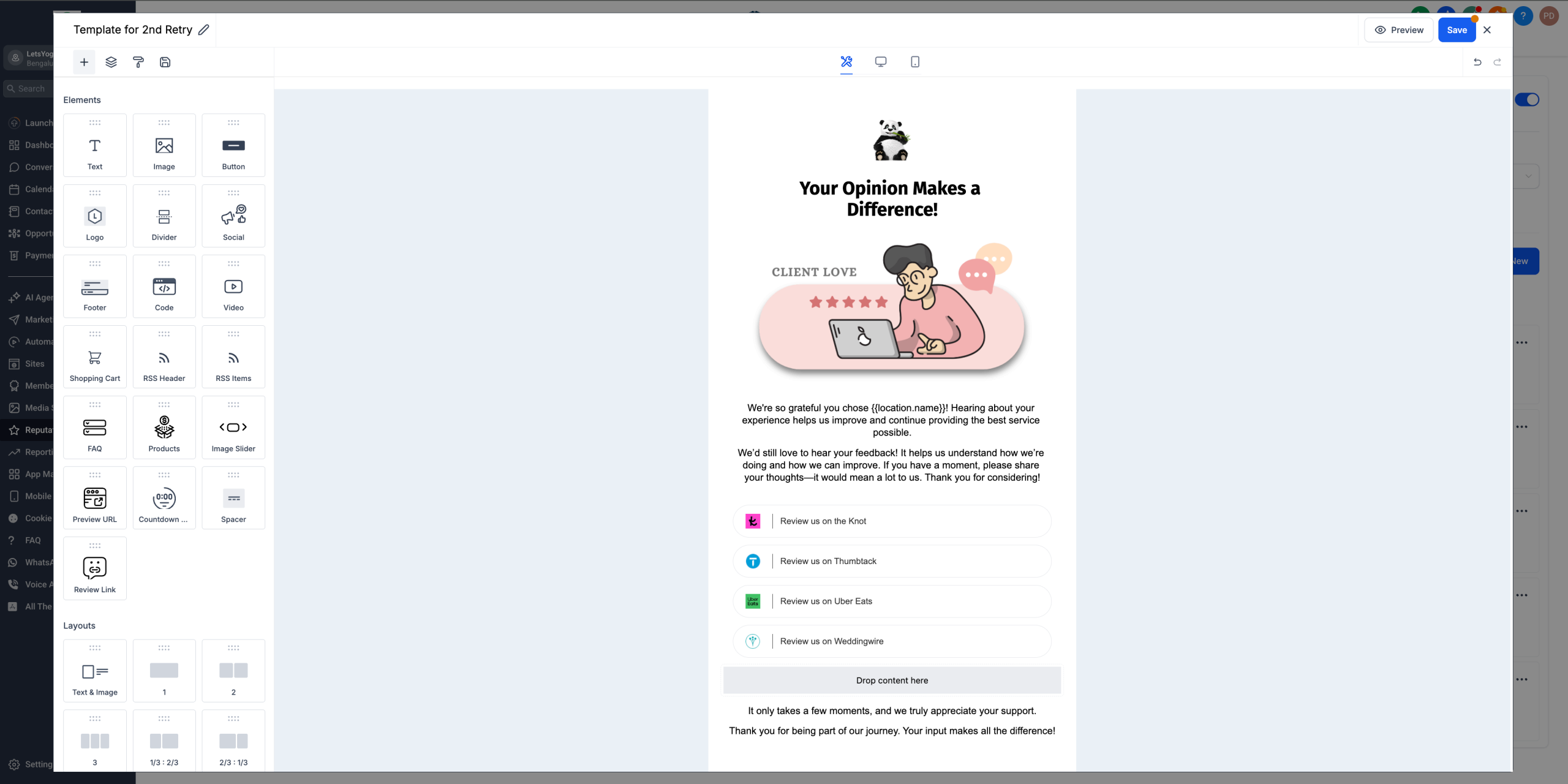
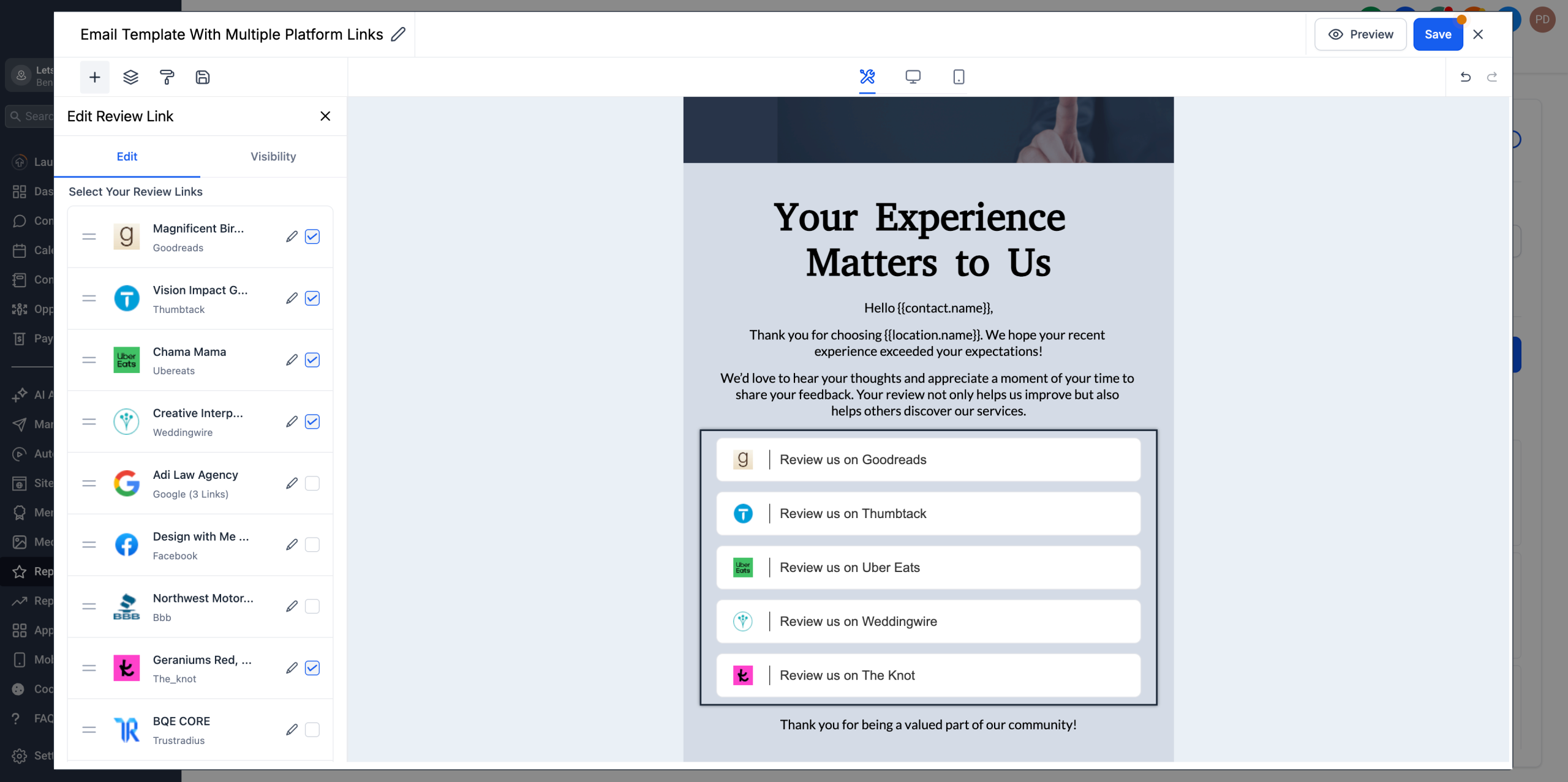
We’ve enhanced the Reputation Management email builder to support multiple review platform links in a single Email. This means your customers can now choose where they’d like to leave a review, increasing flexibility and boosting response rates.
✨ What’s New?
You can now:
– Add multiple review links (Google, Facebook, Yelp, etc.) in a single email
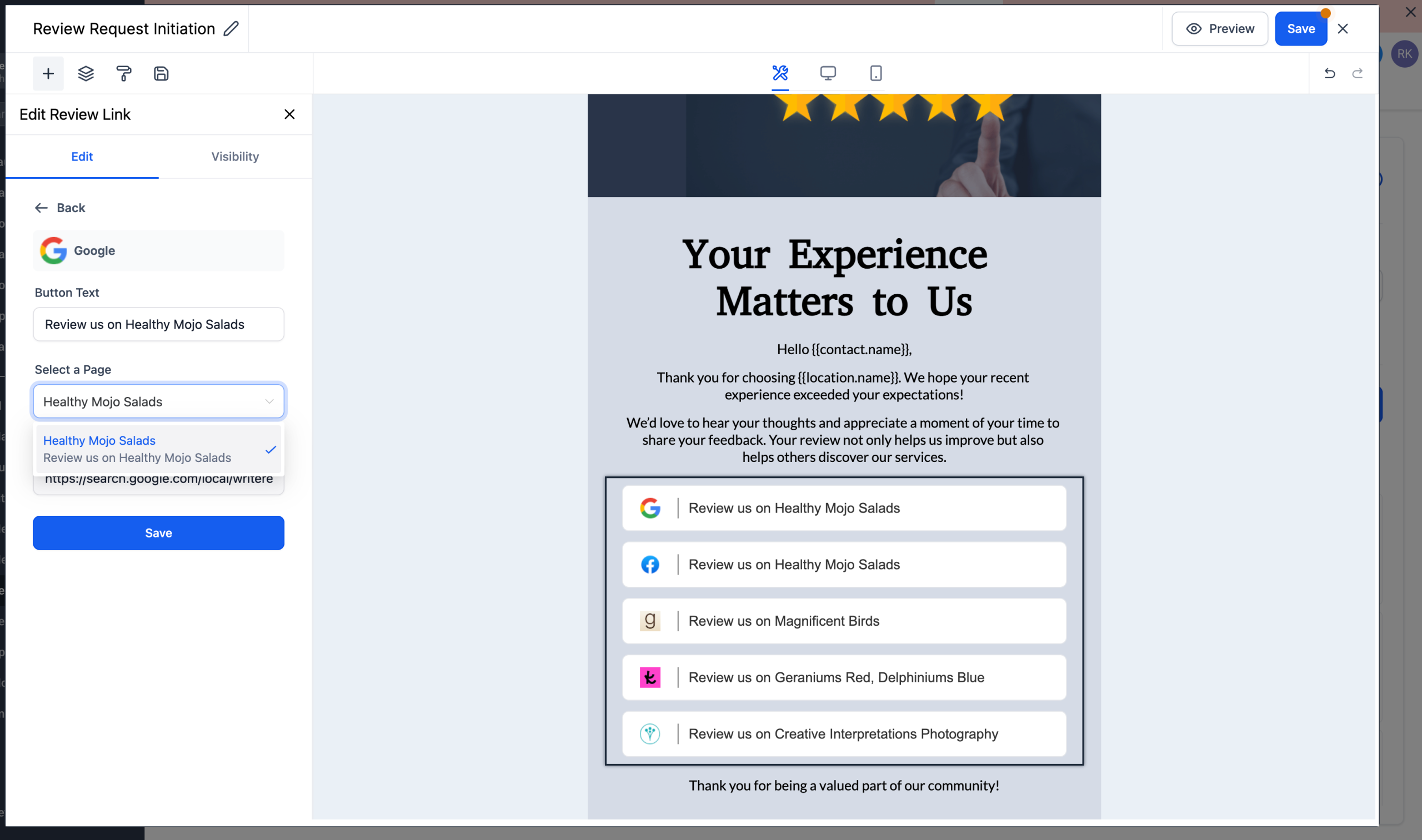
– Customise CTA text for each platform (e.g., “Leave a review on Google”)
– Select/Unselect, Reorder, and Delete links easily in the builder
– Choose a specific GBP page if multiple are connected for a location
– Get built-in error validation to ensure all links are valid
✅ What You Can Do:
– Give customers more platform choices to leave reviews
– Improve conversion by reducing friction in the review flow
– Tailor and prioritise links using drag-and-drop reordering
– Personalise CTAs to match tone and platform intent
– Preview and schedule emails with full control over review link layout
📍 Available under:
1. Reputation → Email Requests → Email Builder/Create New → Review Links
2. The Review Links Component will autoselect and show all the platforms connected for you
We’re always looking for ways to make review collection smarter and easier.
Got a feature idea? Have suggestions on what could ease your review management?
Drop us a line at Ideas Board or or reach out directly to [email protected] or [email protected] — we’d love to hear from you. 🙌