📣 SMS Review Requests – Create & Use Custom Templates for Recurring Messages
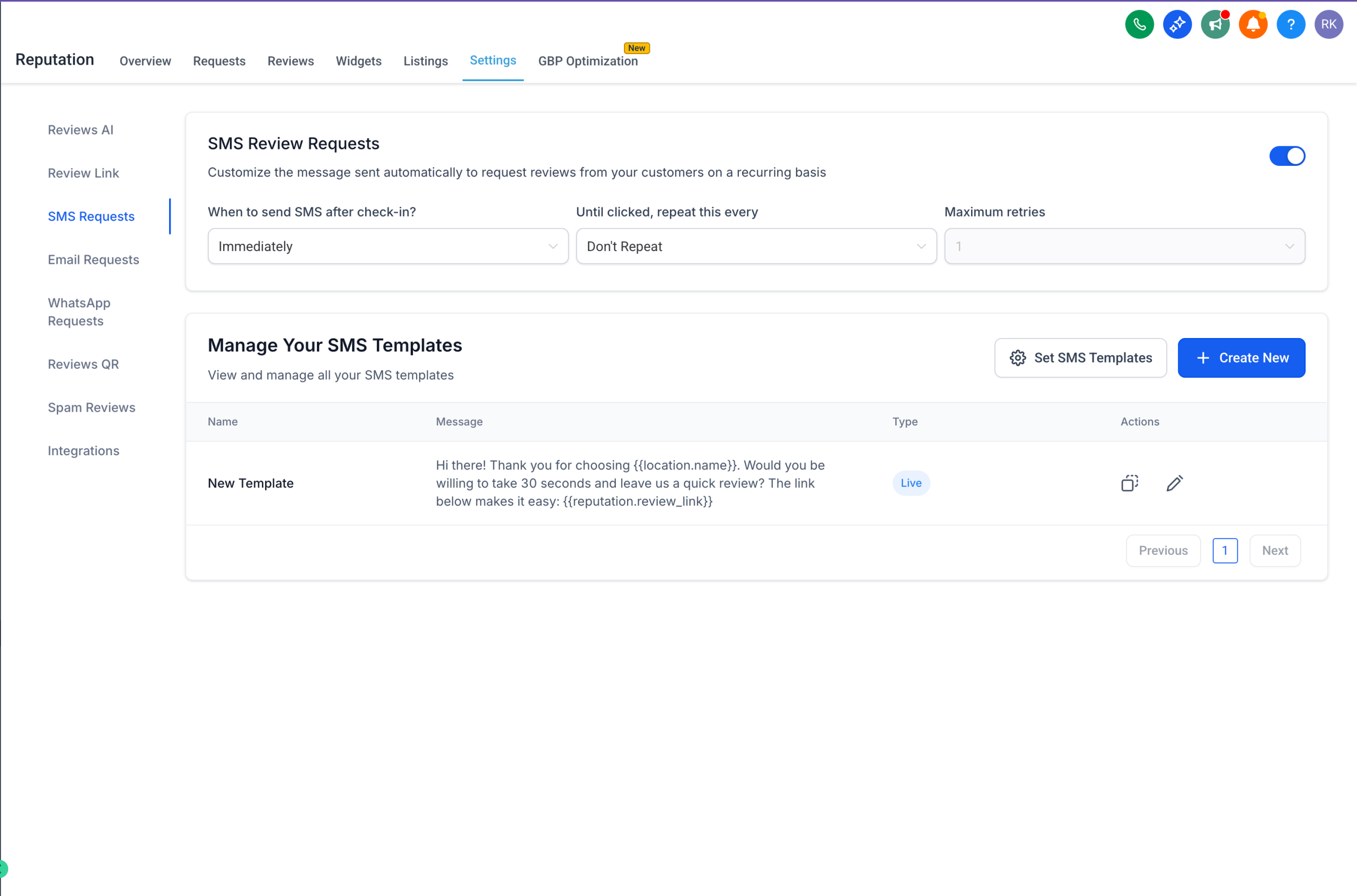
You asked for more personalisation — and it’s here! Users can now create, edit, and assign custom SMS templates for their recurring review requests, giving you more control over tone, branding, and customer engagement.
✨ What’s New?
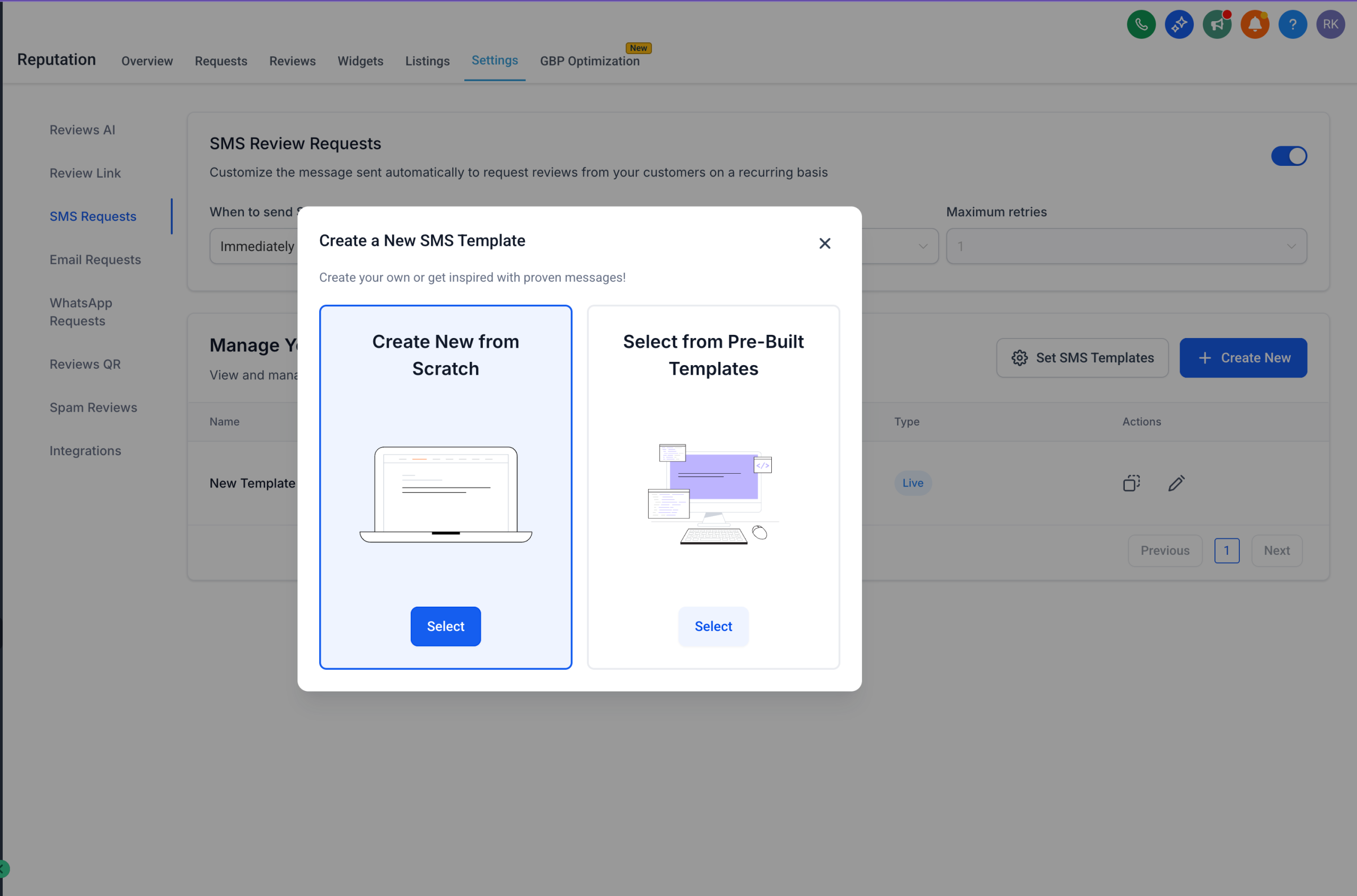
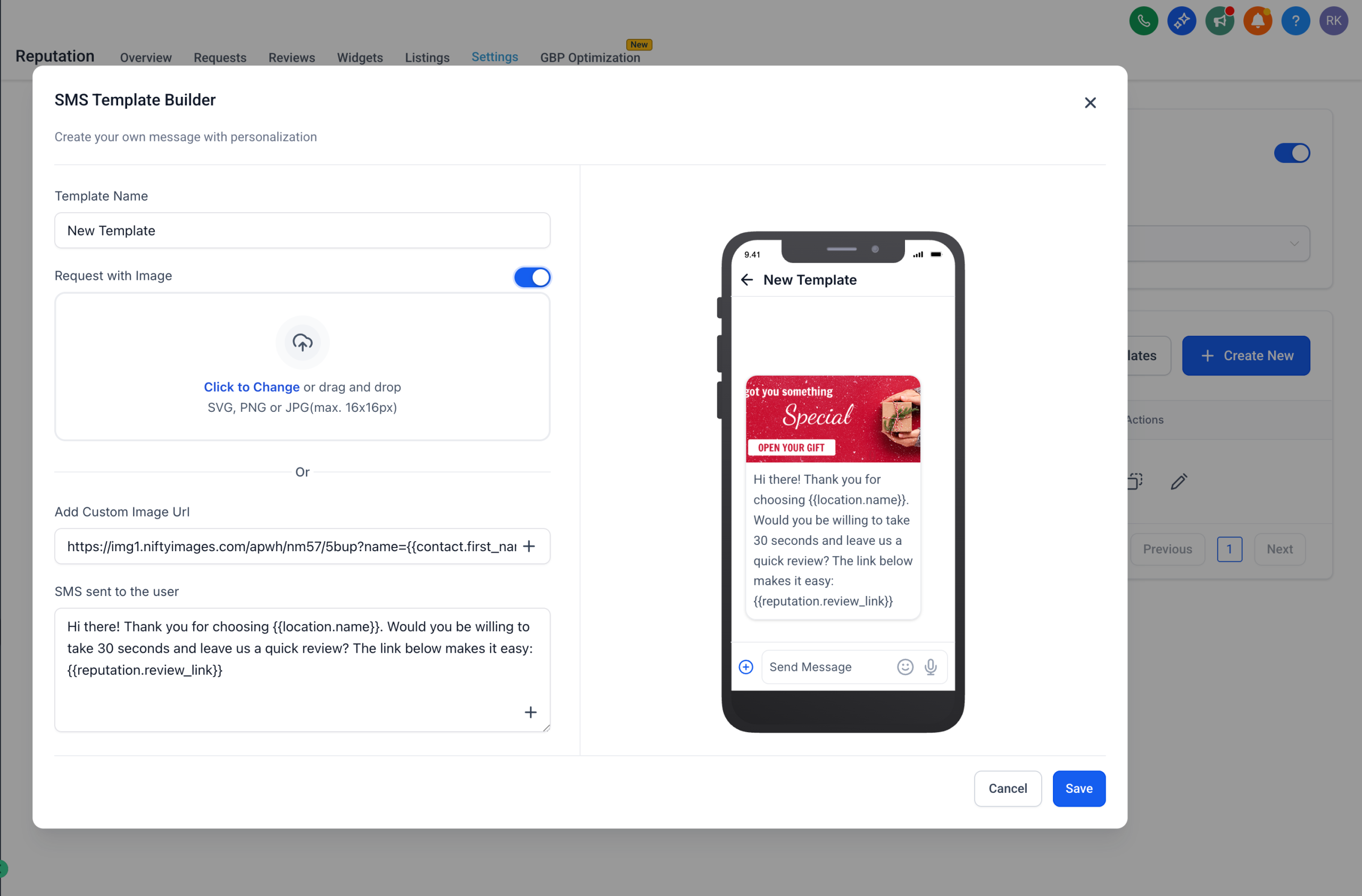
📝 Create Custom SMS Templates for Recurring Requests
Personalise your recurring review requests using:
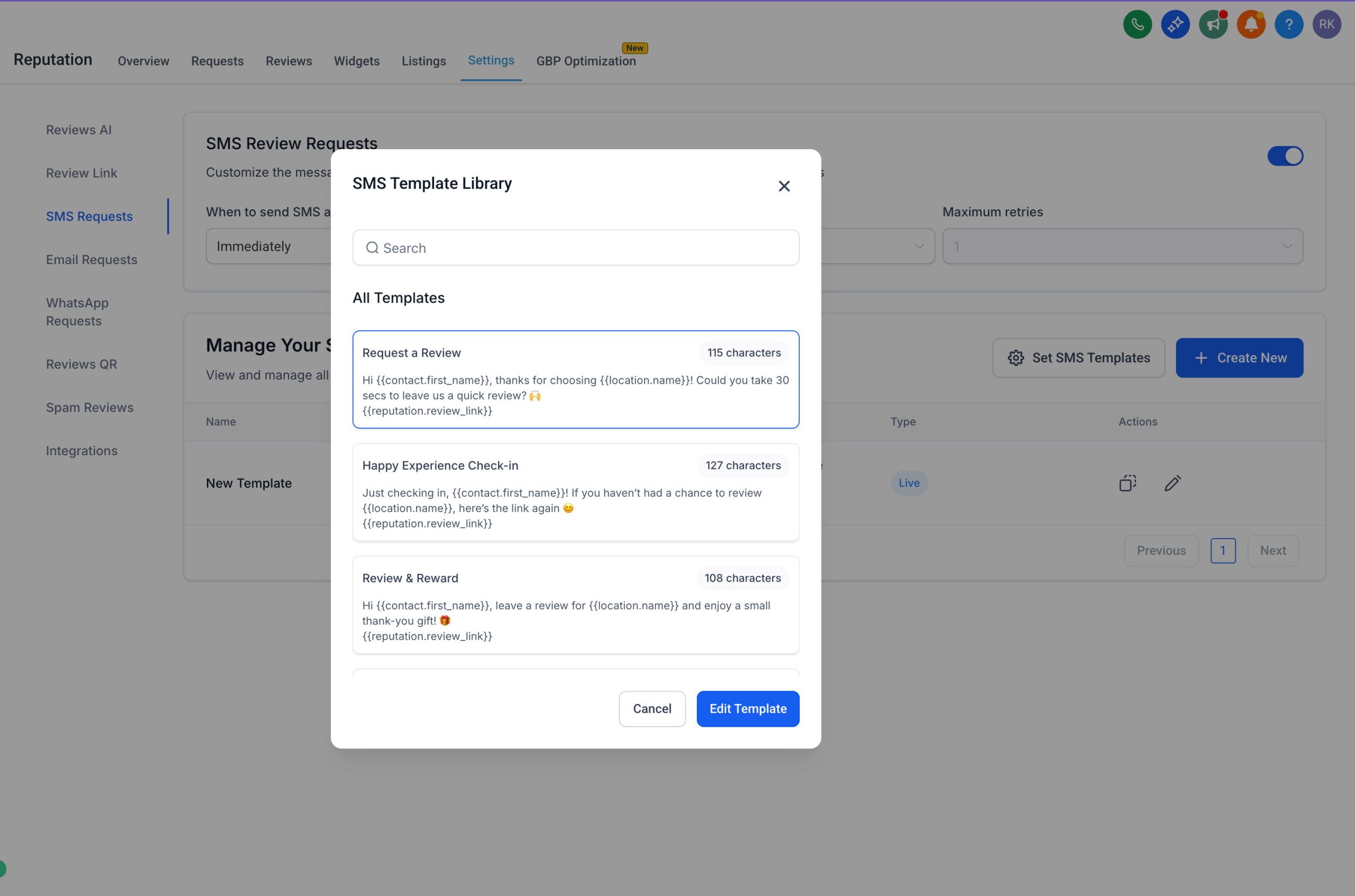
– Your own message templates
– Pre-built HighLevel templates
– Smart custom fields like {{contact.first_name}}
🖼️ Dynamic Image Support with URLs (NiftyImages Compatible)
No more sending the same static image! You can now:
– Add dynamic image links for each contact
– Personalise images using merge fields (e.g., first name)
– Send unique visuals for every review request 🔥
✅ What You Can Do:
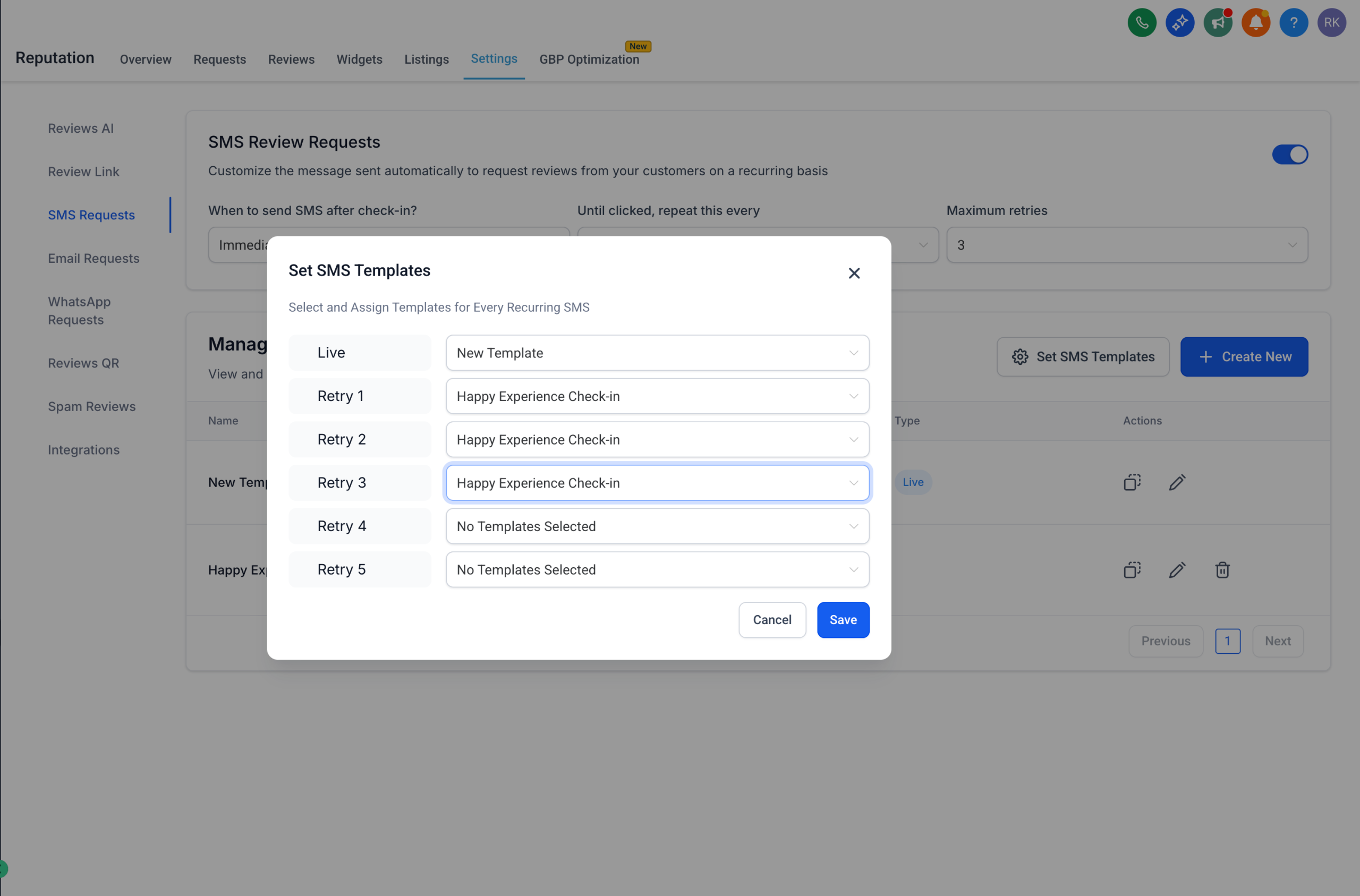
– Craft on-brand, personalised follow-ups with saved SMS templates
– Use merge tags in image URLs to send personalised graphics
– Improve engagement and review completion rates
– Manage & preview everything before you hit send
📍 Navigate to:
Reputation → Settings → SMS Requests
– Manage templates, set defaults, and personalize your recurring flow
– (And yes — dynamic image support works via image links now!)
We’re always looking for ways to make review collection smarter and easier.
Got a feature idea? Have suggestions on what could ease your review management?
Drop us a line at Ideas Board or or reach out directly to [email protected] or [email protected] — we’d love to hear from you. 🙌
GPT Action Now Available at Zero Markup Pricing
You asked and we have delivered..!!
We’ve transformed GPT Action pricing to deliver complete transparency and significant cost savings. You now pay exactly what OpenAI charges with zero markup.
What’s Changed?
Before: Fixed Per Execution Pricing
Now: Token Based Zero Markup Pricing You’re charged based on:
– Input tokens consumed
– Output tokens generated
– Model selected
This means you pay OpenAI’s exact rates with nothing more, nothing less.
Real Impact: More Value for Your Money
What $10 Gets You:
GPT-4o:
– Process approximately 3 million input words OR
– Generate approximately 750,000 output words
GPT-4o Mini:
– Process approximately 50 million input words OR
– Generate approximately 12.5 million output words
Note: Actual usage combines both input and output tokens
Why We Made This Change
– You asked, we delivered: All external AI models will be at Rack Pricing
– Simplicity: Straightforward token based pricing makes budgeting easier
What This Means for You
– Immediate cost reduction on all workflows using GPT action
– Complete transparency: see exactly what you’re paying for
– Scale confidently: costs scale linearly with usage
– No hidden fees: if OpenAI charges it, that’s what you pay
Re-Billing
– No changes in the re-bililng. You can still re-bill the action.
– Re-Billing is available under External AI Models category
Get Started
– This pricing is already live for all accounts. Your existing GPT Actions are automatically benefiting from the new pricing model with no action required.
– With lower costs per execution, there’s never been a better time to integrate AI throughout your workflows
New Workflow Pricing Categories: Premium Features & AI Models
Overview
We’ve restructured our paid actions and triggers into clearer categories to simplify pricing and improve user experience. This update introduces two distinct categories:
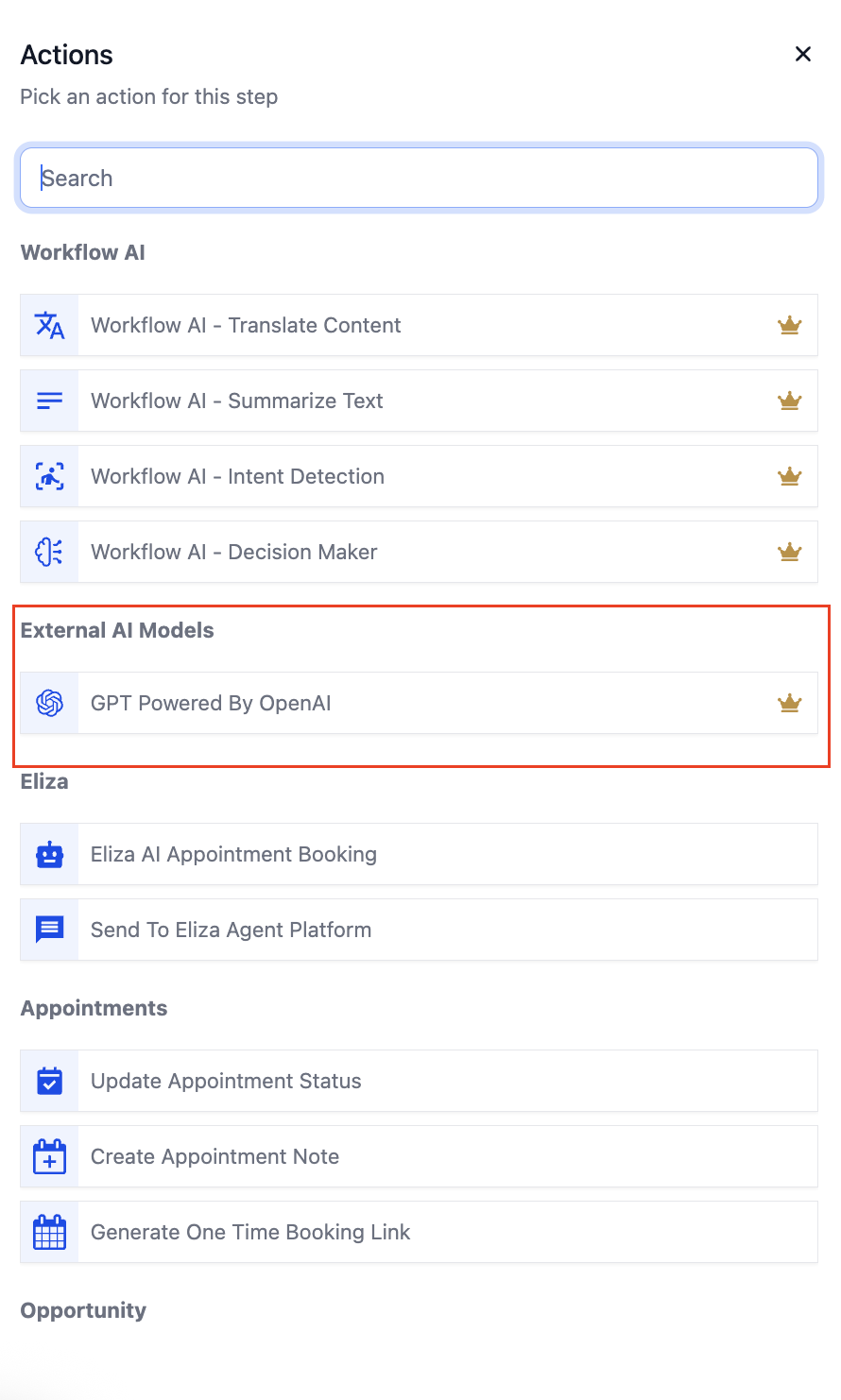
– Workflow – Premium Features
– Workflow – External AI Models
What’s New?
We’ve re-organized our chargeable actions and triggers into two categories:
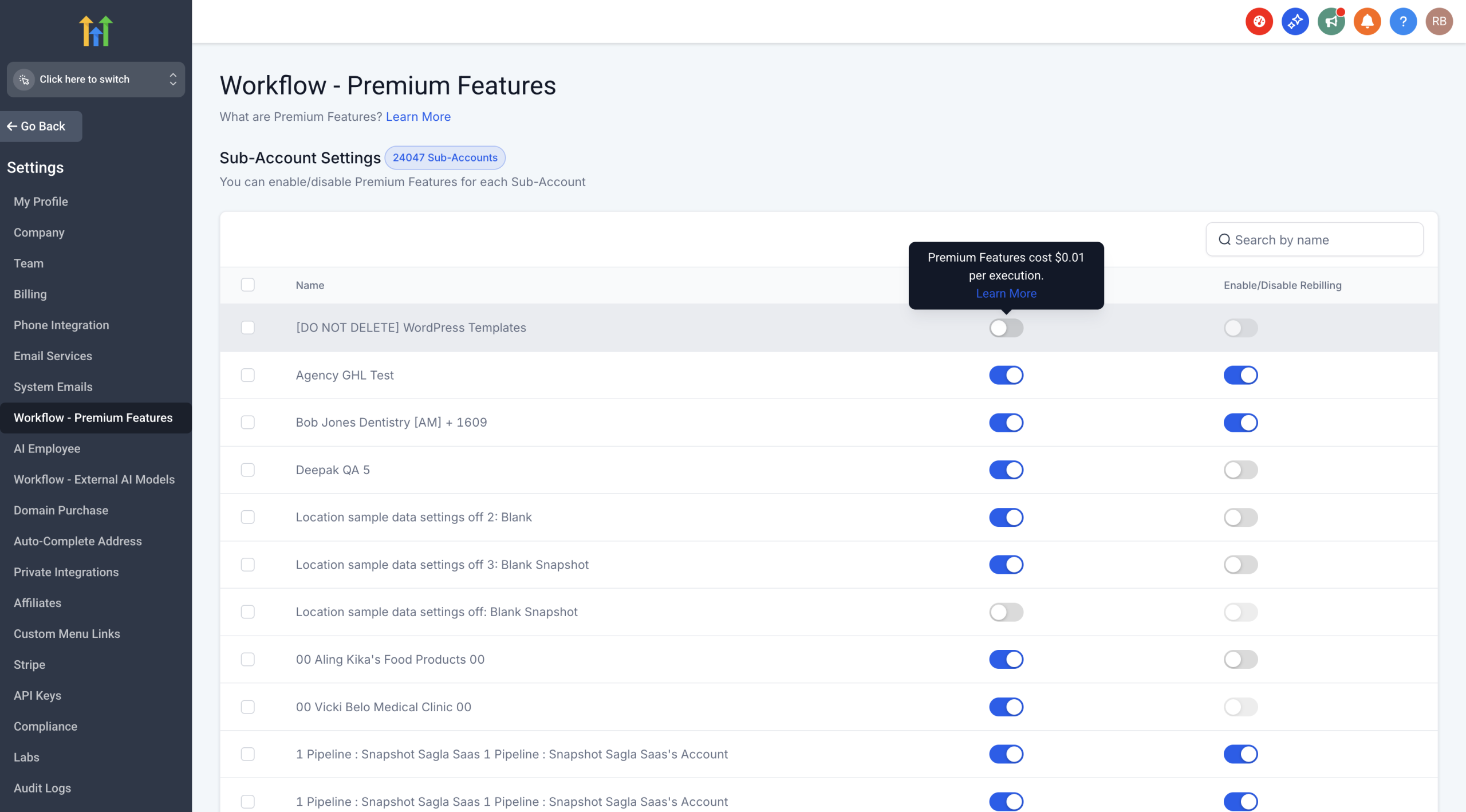
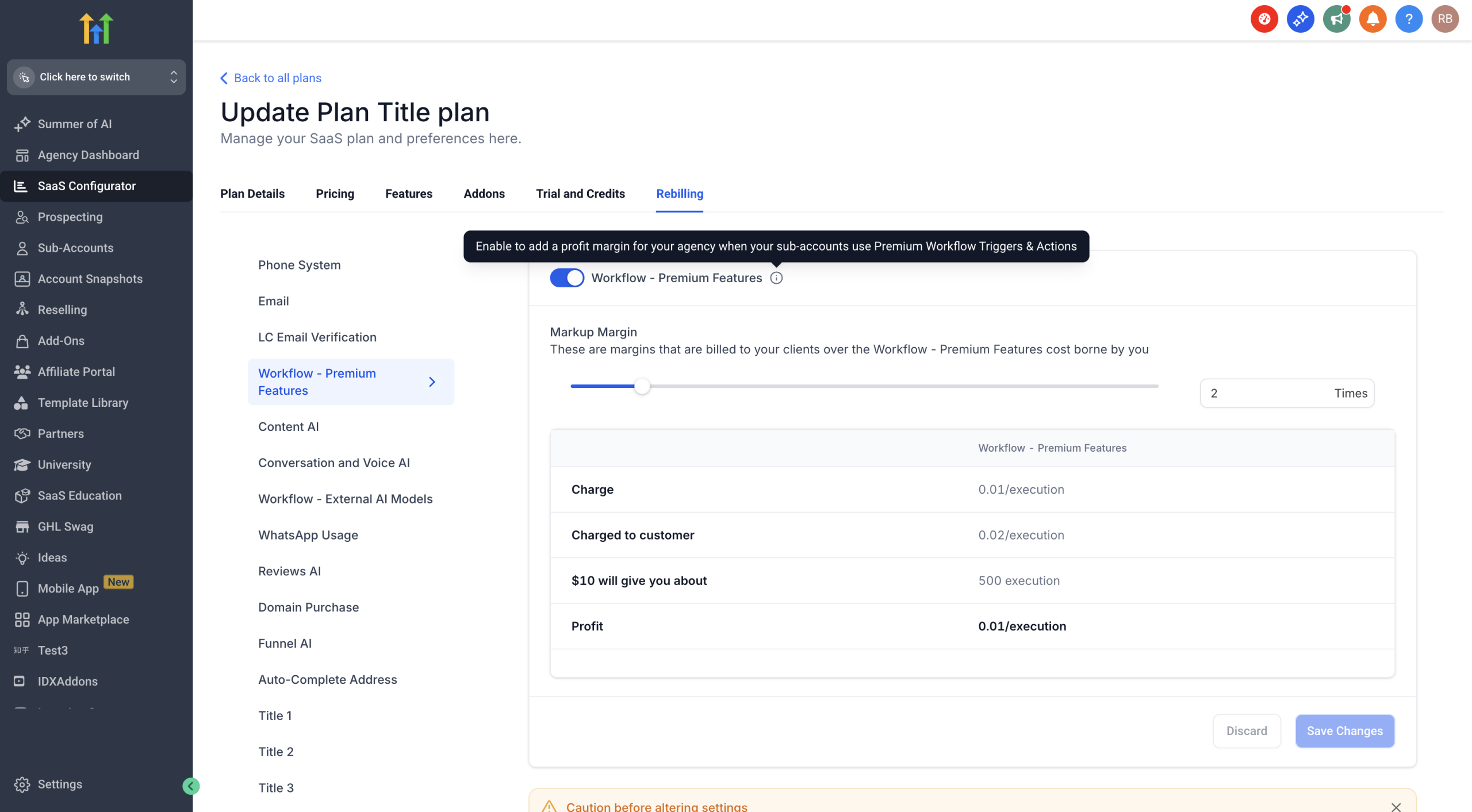
1. Workflow – Premium Features
– Includes all premium actions, triggers and Workflow AI actions are now Premium actions
– Fixed pricing at $0.01 per execution
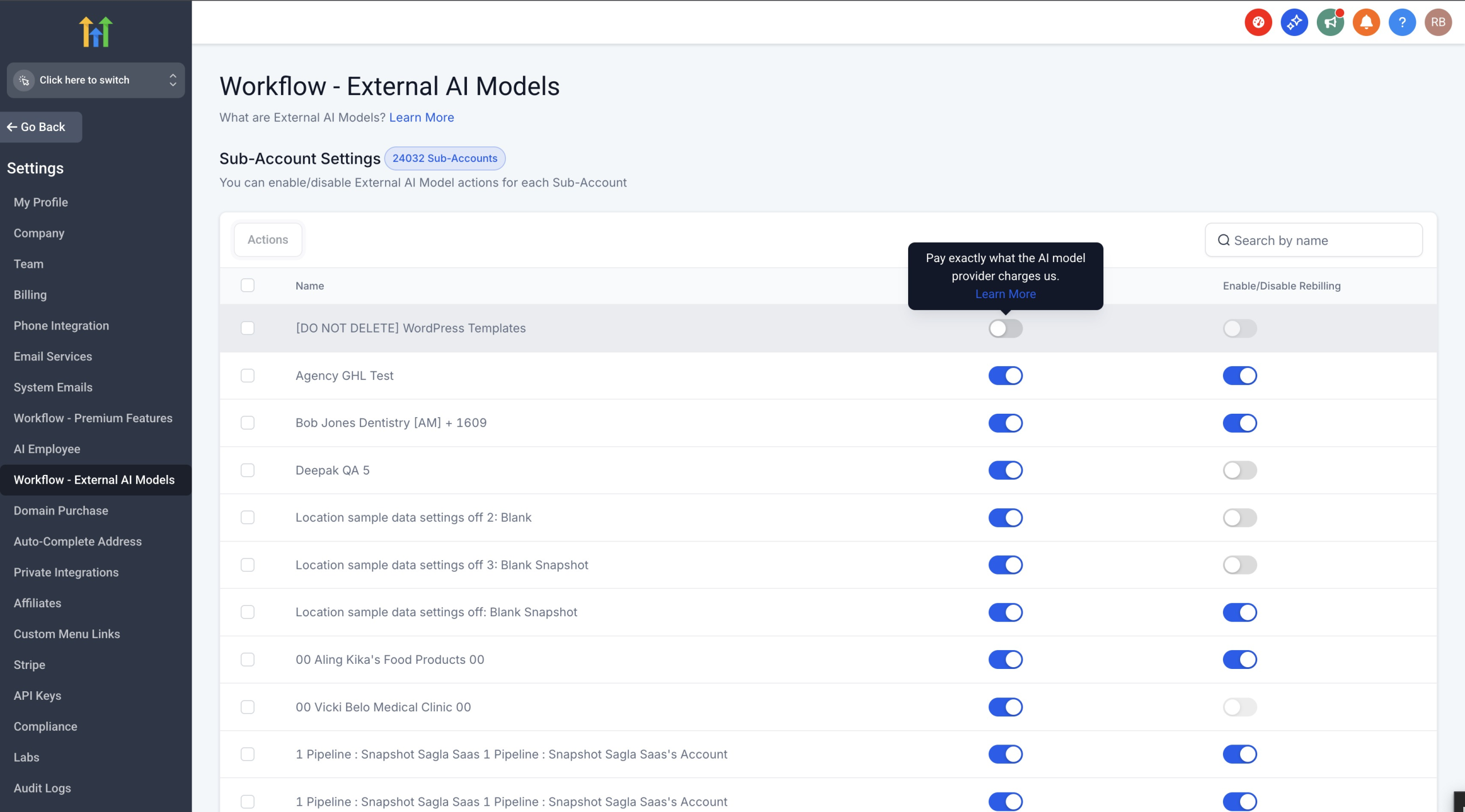
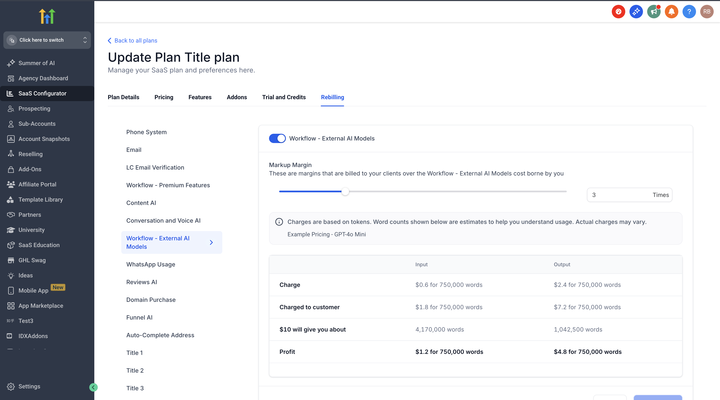
2. Workflow – External AI Models
– GPT Action (at OpenAI rack pricing)
– Future LLM integrations
– Pay exactly what the AI provider charges – no markup
Key Changes
Workflow AI Actions Are Now Premium Actions: All Workflow AI actions now fall under Premium Features at $0.01/execution:
– Translate Content
– Summarize Text
– Decision Maker
– Intent Detection
These Workflow AI actions join Copy Contact, Custom Webhook, and many other premium actions and triggers under one unified Premium Features category.
Staying in External AI Models:
– GPT Action – Continues at OpenAI rack pricing
How to Enable
For Both Categories:
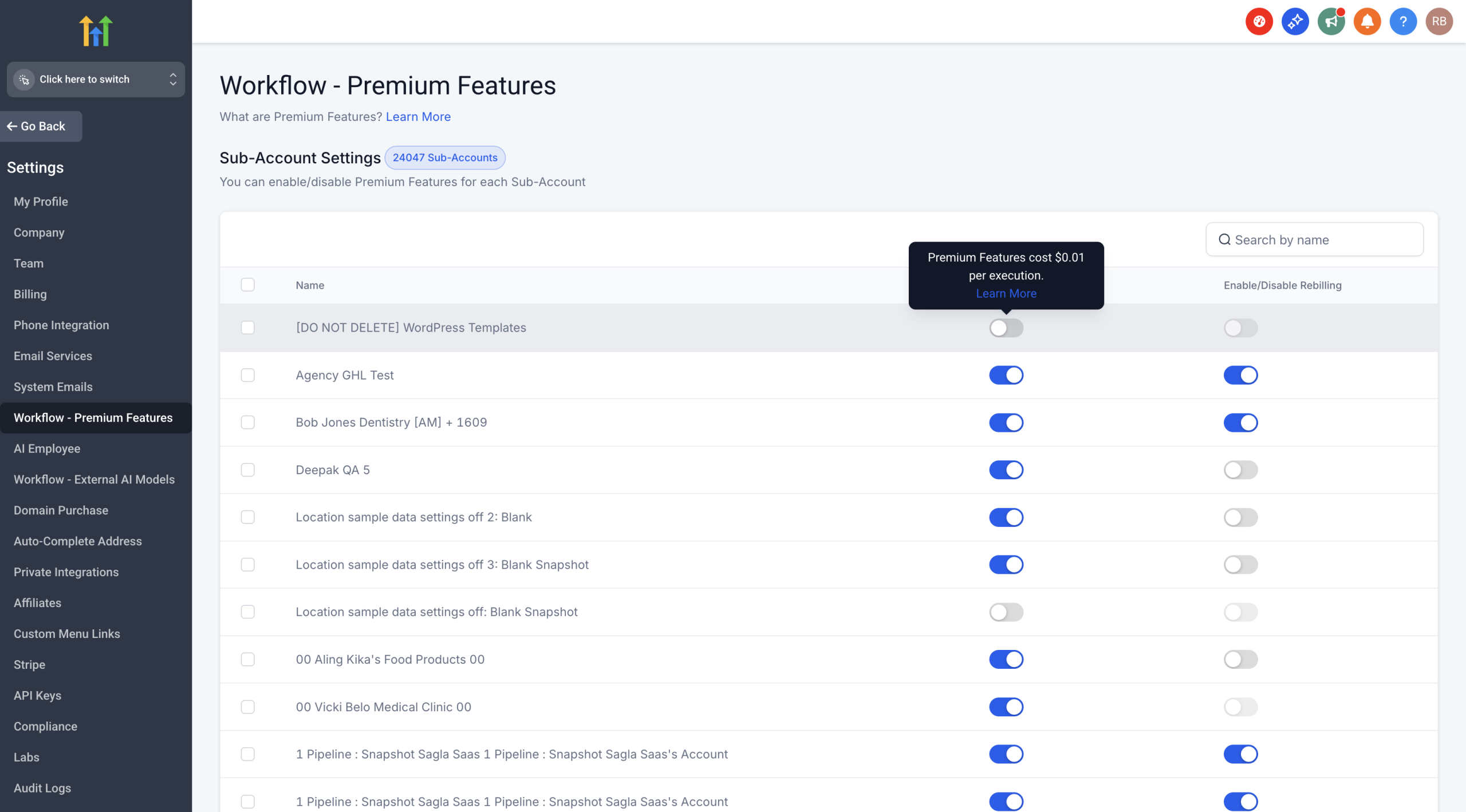
1. Navigate to any action that requires enablement
2. Click “Enable Now” when prompted
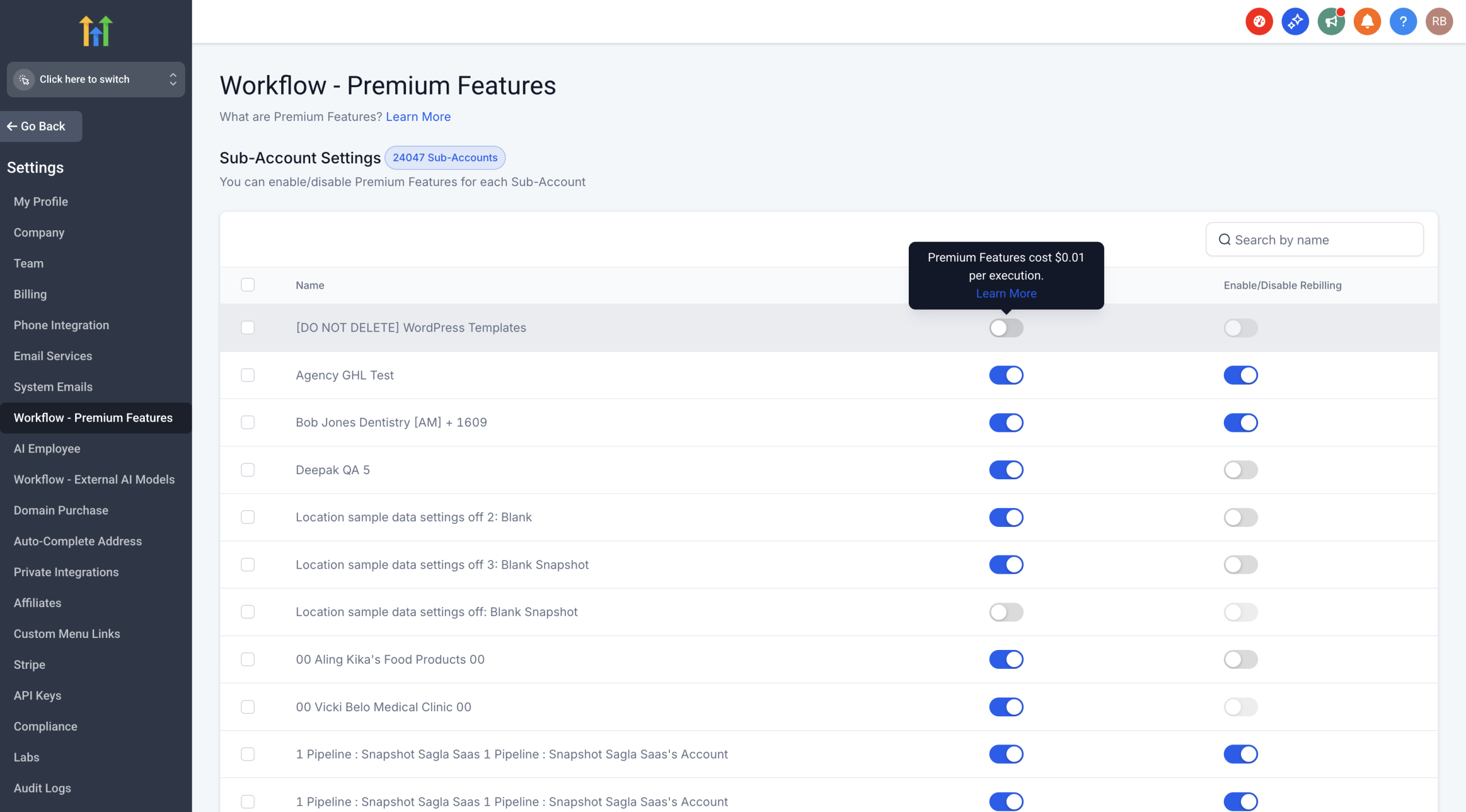
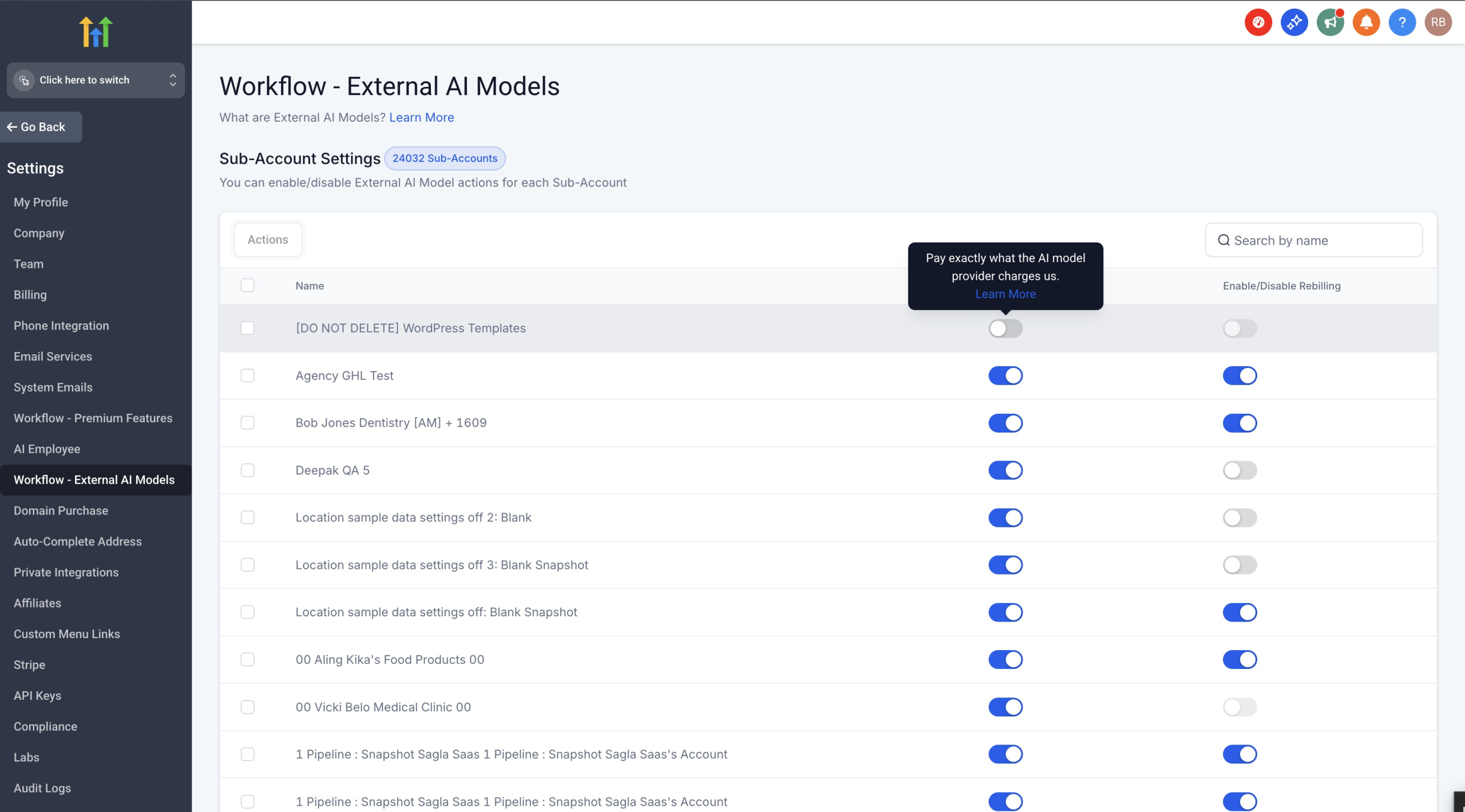
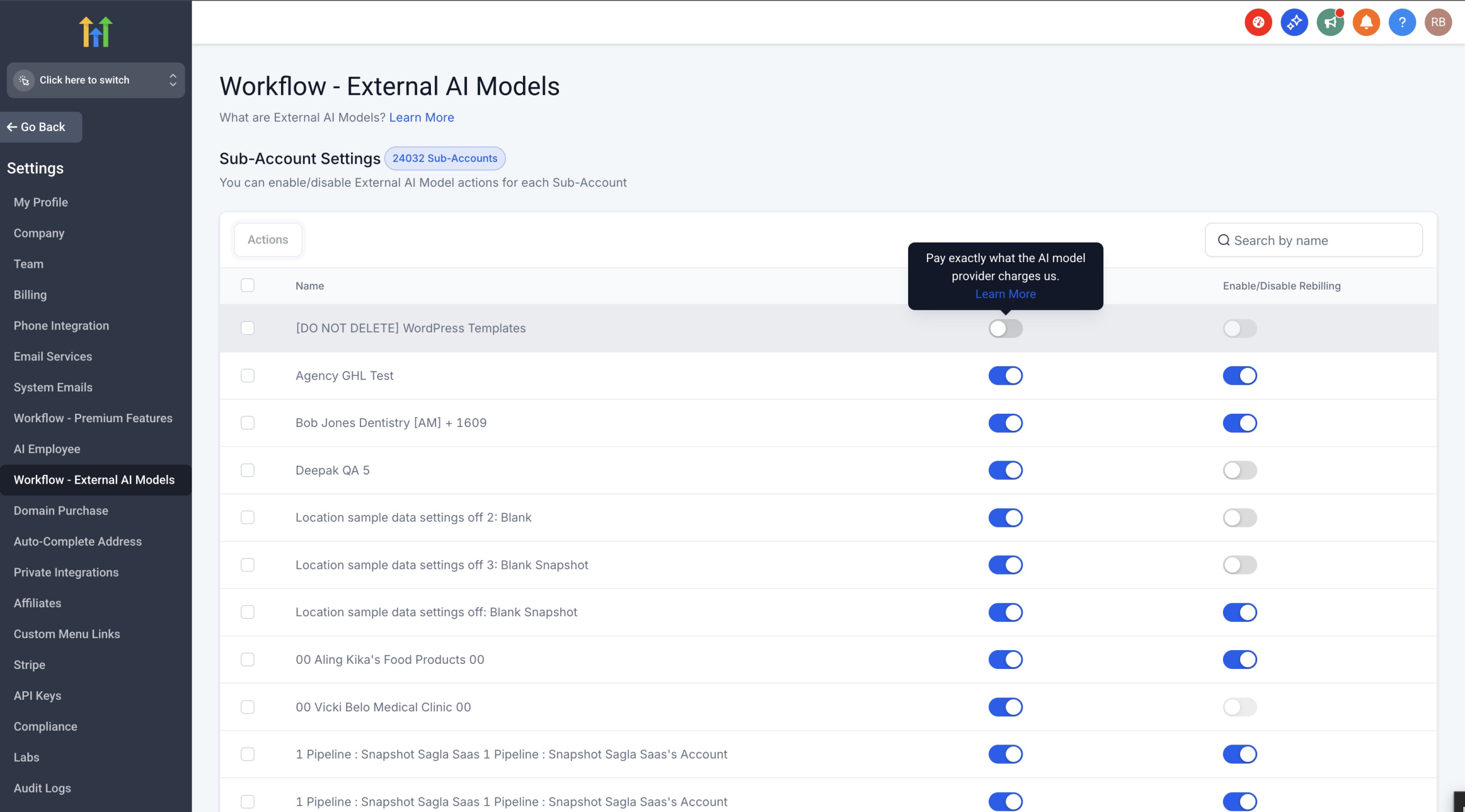
3. You’ll be taken to Sub-Account Settings where you can:
– Toggle specific sub-accounts on/off
– Enable/Disable rebilling for each sub-account
– View which sub-accounts have the feature enabled
Sub-Account Management:
– Access via Settings → Workflow – Premium Features or Workflow – External AI Models
– Enable/disable features for individual sub-accounts
– Configure rebilling settings per sub-account
Re-billing Capabilities
Both categories support re-billing:
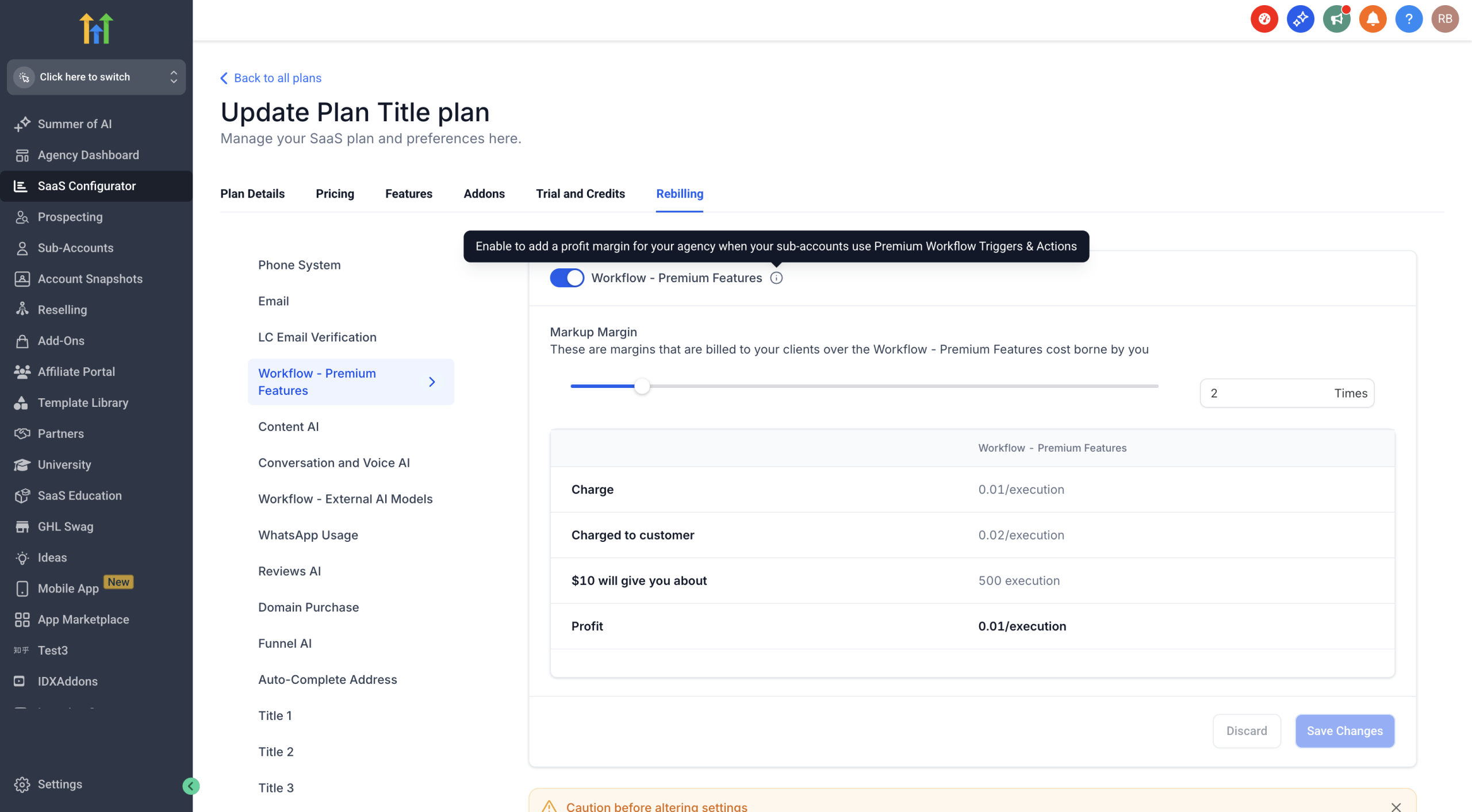
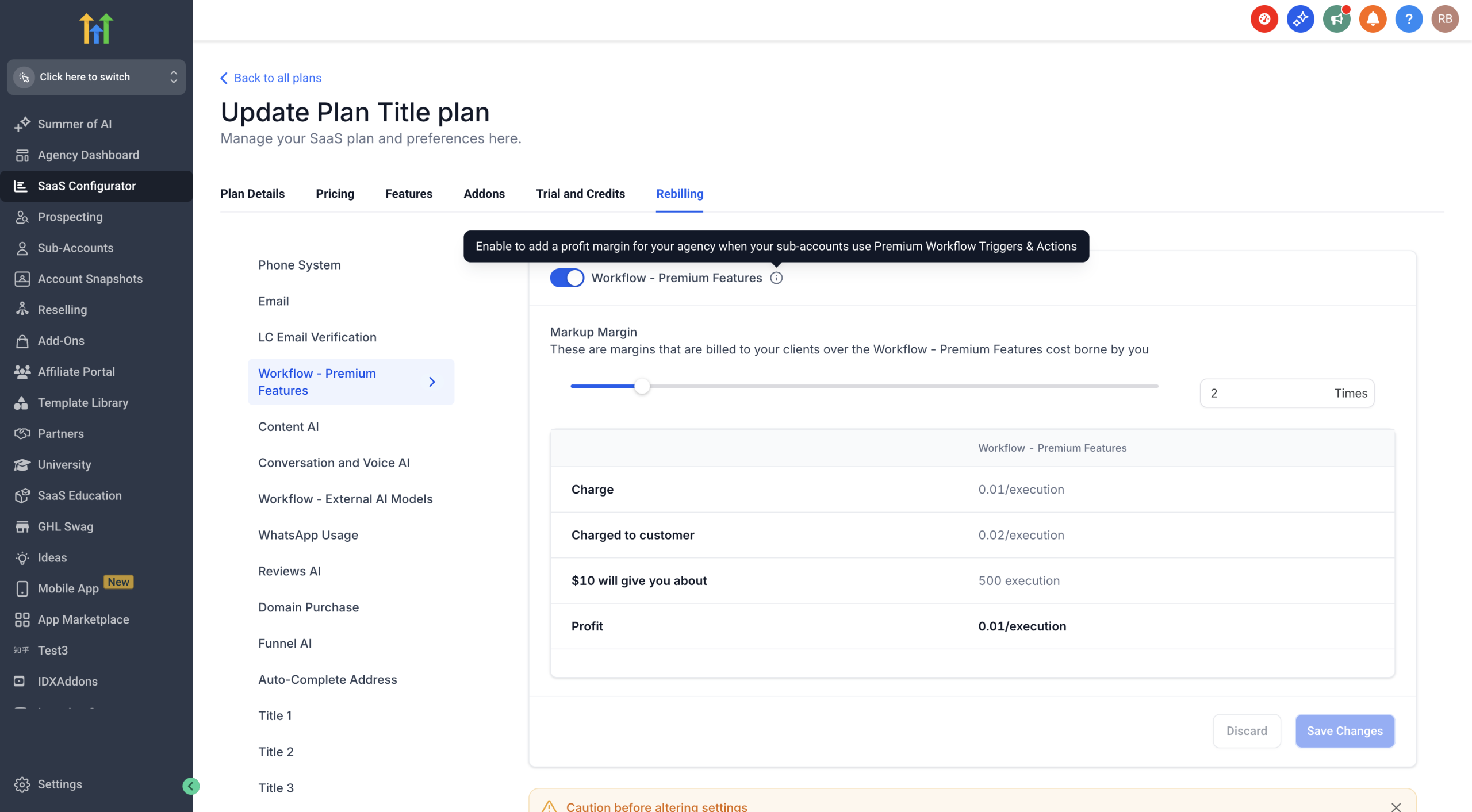
– Workflow – Premium Execution: Set your own markup above the $0.01/execution base cost
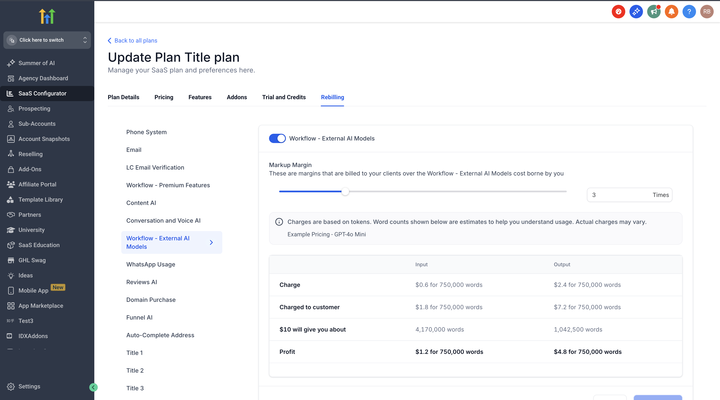
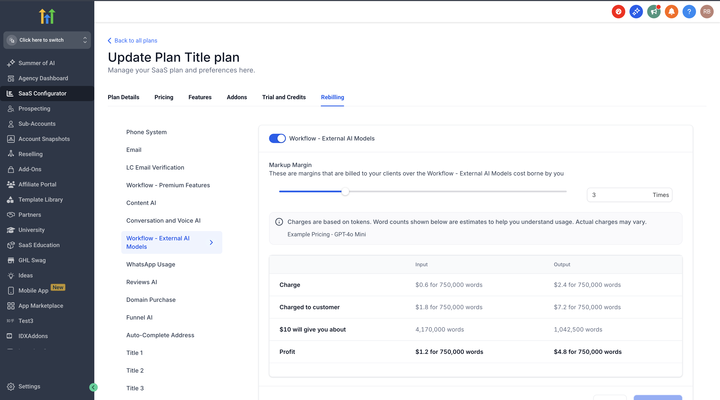
– Workflow – External AI Models: Add your markup on top of the OpenAI rack pricing
– Configure re-billing amounts in SaaS Configurator under the Rebilling tab
Why This Change?
– Clarity: Clear distinction between fixed-price actions and variable-price AI models
– Better organization: Makes it easier to find and use the right actions
– Future-ready: Sets the foundation for adding more AI providers
What This Means for You
– Predictable budgeting with $0.01/execution for Premium Execution actions
– Transparent pricing for External AI Models – pay exactly what providers charge
– Flexible re-billing options for both categories to set your own margins
New Workflow Pricing Categories: Premium Features & AI Models
Overview
We’ve restructured our paid actions and triggers into clearer categories to simplify pricing and improve user experience. This update introduces two distinct categories:
– Workflow – Premium Features
– Workflow – External AI Models
What’s New?
We’ve re-organized our chargeable actions and triggers into two categories:
1. Workflow – Premium Features
– Includes all premium actions, triggers and Workflow AI actions are now Premium actions
– Fixed pricing at $0.01 per execution
2. Workflow – External AI Models
– GPT Action (at OpenAI rack pricing)
– Future LLM integrations
– Pay exactly what the AI provider charges – no markup
Key Changes
Workflow AI Actions Are Now Premium Actions: All Workflow AI actions now fall under Premium Features at $0.01/execution:
– Translate Content
– Summarize Text
– Decision Maker
– Intent Detection
These Workflow AI actions join Copy Contact, Custom Webhook, and many other premium actions and triggers under one unified Premium Features category.
Staying in External AI Models:
– GPT Action – Continues at OpenAI rack pricing
How to Enable
For Both Categories:
1. Navigate to any action that requires enablement
2. Click “Enable Now” when prompted
3. You’ll be taken to Sub-Account Settings where you can:
– Toggle specific sub-accounts on/off
– Enable/Disable rebilling for each sub-account
– View which sub-accounts have the feature enabled
Sub-Account Management:
– Access via Settings → Workflow – Premium Features or Workflow – External AI Models
– Enable/disable features for individual sub-accounts
– Configure rebilling settings per sub-account
Re-billing Capabilities
Both categories support re-billing:
– Workflow – Premium Execution: Set your own markup above the $0.01/execution base cost
– Workflow – External AI Models: Add your markup on top of the OpenAI rack pricing
– Configure re-billing amounts in SaaS Configurator under the Rebilling tab
Why This Change?
– Clarity: Clear distinction between fixed-price actions and variable-price AI models
– Better organization: Makes it easier to find and use the right actions
– Future-ready: Sets the foundation for adding more AI providers
What This Means for You
– Predictable budgeting with $0.01/execution for Premium Execution actions
– Transparent pricing for External AI Models – pay exactly what providers charge
– Flexible re-billing options for both categories to set your own margins
New Workflow Pricing Categories: Premium Features & AI Models
Overview
We’ve restructured our paid actions and triggers into clearer categories to simplify pricing and improve user experience. This update introduces two distinct categories:
– Workflow – Premium Features
– Workflow – External AI Models
What’s New?
We’ve re-organized our chargeable actions and triggers into two categories:
1. Workflow – Premium Features
– Includes all premium actions, triggers and Workflow AI actions are now Premium actions
– Fixed pricing at $0.01 per execution
2. Workflow – External AI Models
– GPT Action (at OpenAI rack pricing)
– Future LLM integrations
– Pay exactly what the AI provider charges – no markup
Key Changes
Workflow AI Actions Are Now Premium Actions: All Workflow AI actions now fall under Premium Features at $0.01/execution:
– Translate Content
– Summarize Text
– Decision Maker
– Intent Detection
These Workflow AI actions join Copy Contact, Custom Webhook, and many other premium actions and triggers under one unified Premium Features category.
Staying in External AI Models:
– GPT Action – Continues at OpenAI rack pricing
How to Enable
For Both Categories:
1. Navigate to any action that requires enablement
2. Click “Enable Now” when prompted
3. You’ll be taken to Sub-Account Settings where you can:
– Toggle specific sub-accounts on/off
– Enable/Disable rebilling for each sub-account
– View which sub-accounts have the feature enabled
Sub-Account Management:
– Access via Settings → Workflow – Premium Features or Workflow – External AI Models
– Enable/disable features for individual sub-accounts
– Configure rebilling settings per sub-account
Re-billing Capabilities
Both categories support re-billing:
– Workflow – Premium Execution: Set your own markup above the $0.01/execution base cost
– Workflow – External AI Models: Add your markup on top of the OpenAI rack pricing
– Configure re-billing amounts in SaaS Configurator under the Rebilling tab
Why This Change?
– Clarity: Clear distinction between fixed-price actions and variable-price AI models
– Better organization: Makes it easier to find and use the right actions
– Future-ready: Sets the foundation for adding more AI providers
What This Means for You
– Predictable budgeting with $0.01/execution for Premium Execution actions
– Transparent pricing for External AI Models – pay exactly what providers charge
– Flexible re-billing options for both categories to set your own margins