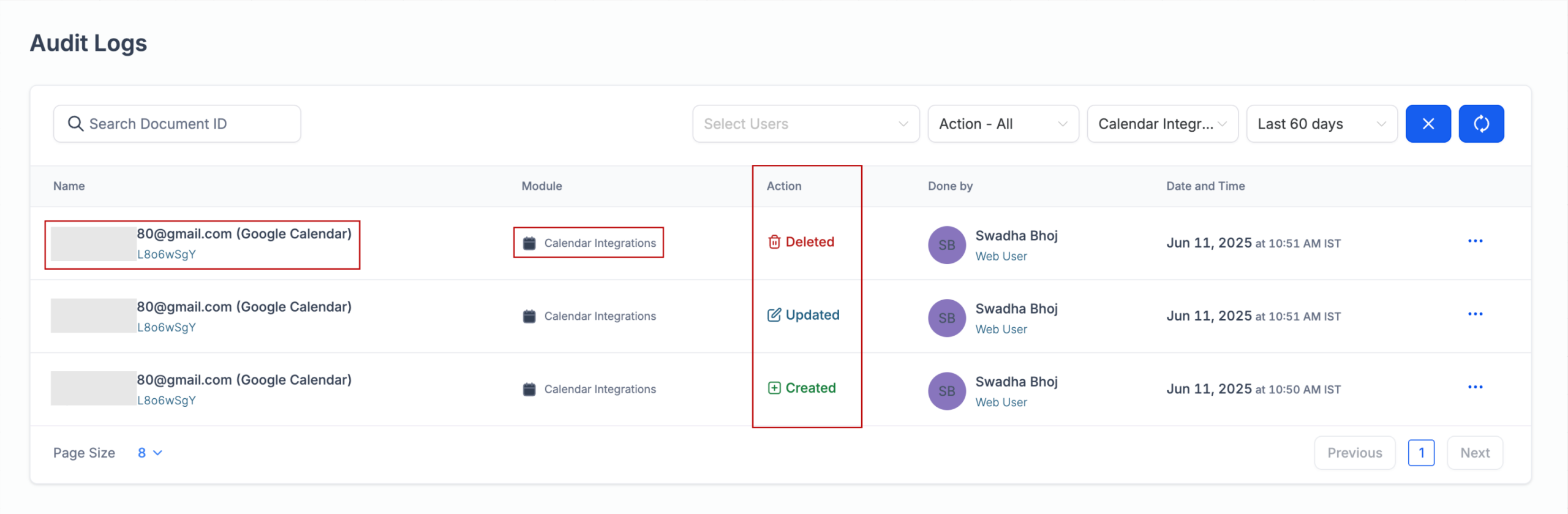
You can now track all key actions taken on calendar and video conferencing integrations directly in the Audit Logs, giving you greater transparency and control.
—
✅ What’s New
– A new module called Calendar Integrations has been added to Audit Logs
– You can now filter logs specifically for calendar/meeting integrations
– The following actions are now tracked: Connect, Reconnect, and Delete
—
🔍 What’s Captured in the Logs
Each log entry provides a detailed snapshot of the integration activity, including:
– The email address associated with the integration
– The integration type (e.g., Google, Outlook, iCloud, Calendly, Zoom, Microsoft Teams)
– Who initiated the action
– Which user the action was performed for
– What action was taken (Create / Update / Delete)
– When the action occurred
—
📘 How to Use
– Go to Settings > Audit Logs
– Use the Calendar Integrations module filter to view relevant events
– Get a full breakdown of all integration changes across your subaccount
—
🧠 Why It Matters
– Gain clear visibility into changes made to calendar and video conferencing integrations
– Improve accountability across your team
– Quickly investigate or audit who connected, disconnected, or reconnected integrations — and for whom