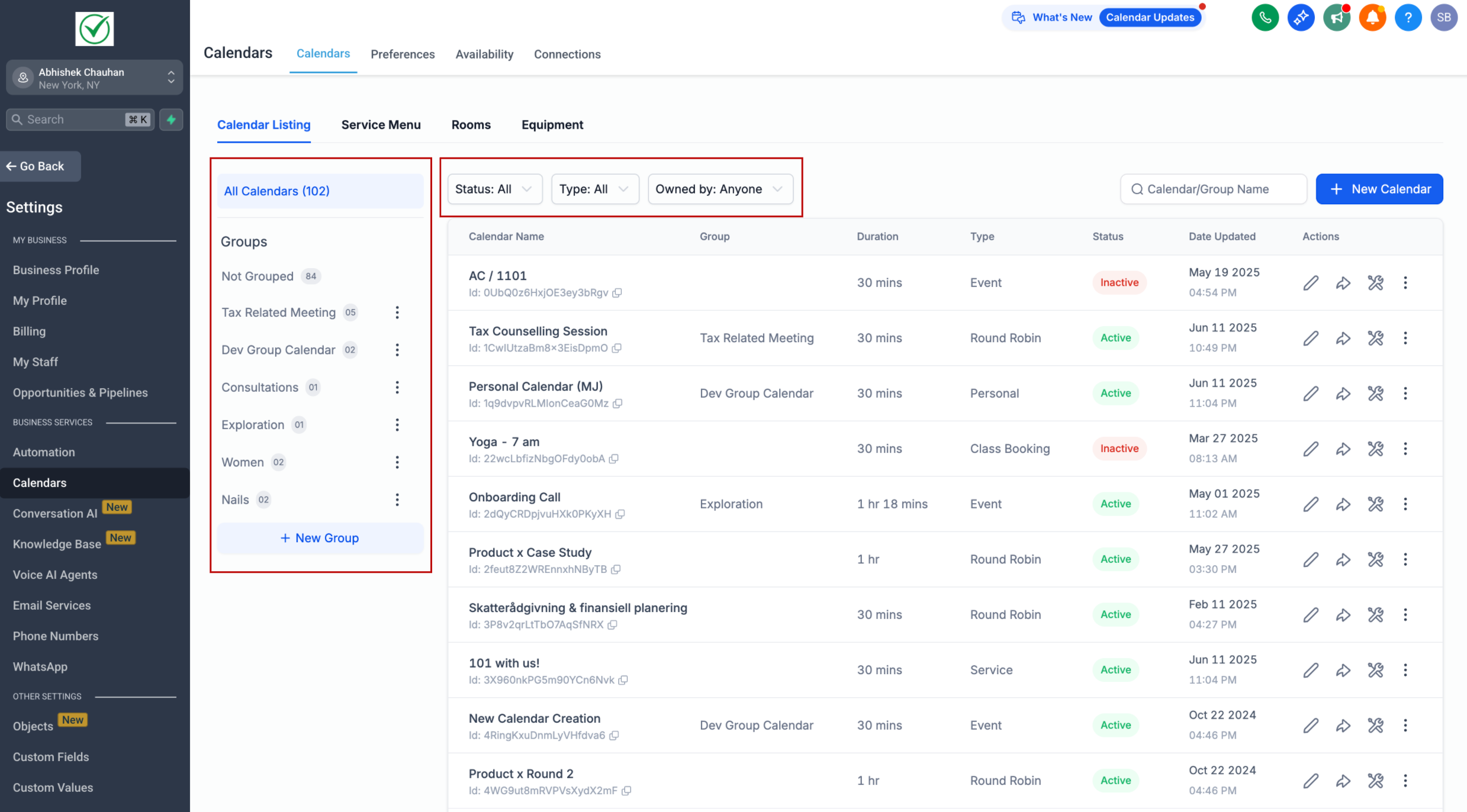
We’ve revamped the Calendar Settings UI to make it more intuitive, consistent, and easier to manage your calendars and groups.
Highlights:
– Unified View: Access both Groups and Calendars from a single screen, mirroring the updated Services UI for better consistency.
– Group Management: Create, edit, and view groups. Click on a group to see all its calendars.
– Smart Filters: Use Status, Calendar Type, and Owner filters to quickly find what you need—view only your calendars or everyone’s.
– Default Calendar Creation: New users added to a location now automatically get a personal calendar to start booking right away.
—
🔧 How to Use
– Go to Calendars > Calendar Settings
– You’ll find the new UI here. Create calendars and groups, assign calendars to groups, and manage everything from one place.
—
🎯 Benefits
– Faster Setup: New users get started immediately with pre-created personal calendars. Users can choose to delete this calendar if needed.
– All-in-One Management: Control calendars and groups from a single, streamlined UI.
– Better Filtering: Quickly drill down to relevant calendars via filters.